Forum Discussion

truongnv
Aug 01, 2023Copper Contributor
Project for the web - How to set default columns in the grid view task?
When creating a project, I want to configure the default display of columns in the task tab. How do I do that?

Aug 01, 2023
truongnv --
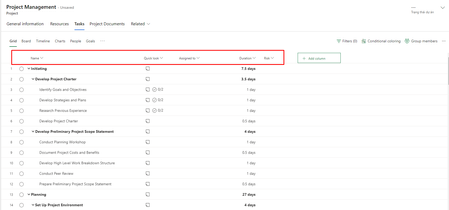
Unfortunately, there is no way to specify a default set of columns in the Grid view in Project for the Web. Every time you create a new project, the software automatically displays the Name, Quick Look, Assigned To, and Duration columns, along with the +Add Column virtual column. This means that during the normal project management life cycle, you will need to change the columns that are displayed in the Grid view. For a helpful video on which columns to display at different stages of the project management life cycle, take a look at my YouTube video on this subject:
https://youtu.be/ga1bovo3394
Hope this helps.
Unfortunately, there is no way to specify a default set of columns in the Grid view in Project for the Web. Every time you create a new project, the software automatically displays the Name, Quick Look, Assigned To, and Duration columns, along with the +Add Column virtual column. This means that during the normal project management life cycle, you will need to change the columns that are displayed in the Grid view. For a helpful video on which columns to display at different stages of the project management life cycle, take a look at my YouTube video on this subject:
https://youtu.be/ga1bovo3394
Hope this helps.

truongnv
Aug 01, 2023Copper Contributor
Thanks for your answer.
Let me ask more. Does it have any API support for adding or changing columns?
Let me ask more. Does it have any API support for adding or changing columns?
- Paul_MatherAug 02, 2023MVP
