Forum Discussion

truongnv
Aug 01, 2023Copper Contributor
Project for the web - How to set default columns in the grid view task?
When creating a project, I want to configure the default display of columns in the task tab. How do I do that?

Aug 01, 2023
truongnv --
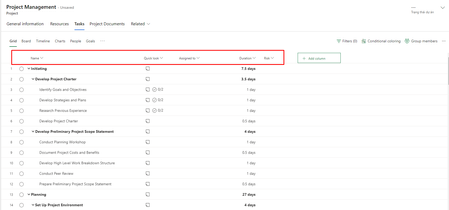
Unfortunately, there is no way to specify a default set of columns in the Grid view in Project for the Web. Every time you create a new project, the software automatically displays the Name, Quick Look, Assigned To, and Duration columns, along with the +Add Column virtual column. This means that during the normal project management life cycle, you will need to change the columns that are displayed in the Grid view. For a helpful video on which columns to display at different stages of the project management life cycle, take a look at my YouTube video on this subject:
https://youtu.be/ga1bovo3394
Hope this helps.
Unfortunately, there is no way to specify a default set of columns in the Grid view in Project for the Web. Every time you create a new project, the software automatically displays the Name, Quick Look, Assigned To, and Duration columns, along with the +Add Column virtual column. This means that during the normal project management life cycle, you will need to change the columns that are displayed in the Grid view. For a helpful video on which columns to display at different stages of the project management life cycle, take a look at my YouTube video on this subject:
https://youtu.be/ga1bovo3394
Hope this helps.
- truongnvAug 01, 2023Copper ContributorThanks for your answer.
Let me ask more. Does it have any API support for adding or changing columns?- Paul_MatherAug 02, 2023MVP

