Forum Discussion

Yolanda_jiang
Dec 19, 2023Copper Contributor
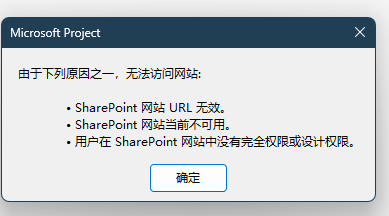
Project desktop side, when using file-sharing, the prompt is as follows

Dec 21, 2023
Yolanda --
To use the Sync with SharePoint feature to share a project, you need to have a SharePoint site already created, or you will need to create a new SharePoint site in the process. Refer to the following:
https://support.microsoft.com/en-us/office/sync-with-a-sharepoint-tasks-list-fb956d2c-723d-4d5a-b7e5-710ef82aa27a
Hope this helps.
To use the Sync with SharePoint feature to share a project, you need to have a SharePoint site already created, or you will need to create a new SharePoint site in the process. Refer to the following:
https://support.microsoft.com/en-us/office/sync-with-a-sharepoint-tasks-list-fb956d2c-723d-4d5a-b7e5-710ef82aa27a
Hope this helps.

Yolanda_jiang
Dec 21, 2023Copper Contributor
Actually, I don't have this page,
when I click to sync-with-a-sharepoint, there is no response on the page, when I click twice, it will report this error:
Can you use this function normally?
Thanks.
- Dec 22, 2023Yolanda --
In that SharePoint dialog, you need to enter the URL of the SharePoint site you want to use. Is your organization actually using SharePoint? If not, all bets are off. And if yes, you should talk with your SharePoint administrator about this problem. Hope this helps.- Yolanda_jiangDec 24, 2023Copper Contributor
Dale_HowardMVP My problem now is that there is no page for me to enter the SharePoint url.
Thanks.
- Dec 26, 2023Yolanda --
This is a user forum that is staffed totally by volunteers, so I doubt I can help you much more with this problem. Something is preventing Microsoft Project from opening the Sync with SharePoint Tasks list page in the Backstage of Microsoft Project (maybe a popup blocker?). If this is a major issue for you, I would recommend you open a ticket with Microsoft Support so that they can troubleshoot and resolve the problem for you. Sorry. I wish I could be of more help to you.