Forum Discussion

Tung_Linh
Oct 24, 2023Copper Contributor
Over allocation not working in Project Online (Plan 3)
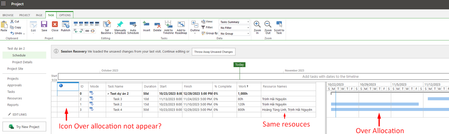
Hi, I am currently facing an issue with Microsoft Project Online (Plan 3) related to the over allocation indicator not working. I am in the process of testing Microsoft Project Online and have set u...
- Oct 24, 2023Tung_Linh --
This is a REALLY GOOD question, my friend, and I congratulate you for asking it.
You CANNOT see overallocation indicators in detailed Project views in PWA. You need to be using Project Online Professional (aka the Microsoft Project Professional desktop application), connected to Project Online. When you open your enterprise projects in Microsoft Project, you will see the overallocation indicators you are seeking in Task views, and you will see the names of overallocated resources formatted in red in Resource views. And of course, you can level resource overallocations using a variety of techniques in Microsoft Project as well. Hope this helps.

Oct 24, 2023
Tung_Linh --
This is a REALLY GOOD question, my friend, and I congratulate you for asking it.
You CANNOT see overallocation indicators in detailed Project views in PWA. You need to be using Project Online Professional (aka the Microsoft Project Professional desktop application), connected to Project Online. When you open your enterprise projects in Microsoft Project, you will see the overallocation indicators you are seeking in Task views, and you will see the names of overallocated resources formatted in red in Resource views. And of course, you can level resource overallocations using a variety of techniques in Microsoft Project as well. Hope this helps.
This is a REALLY GOOD question, my friend, and I congratulate you for asking it.
You CANNOT see overallocation indicators in detailed Project views in PWA. You need to be using Project Online Professional (aka the Microsoft Project Professional desktop application), connected to Project Online. When you open your enterprise projects in Microsoft Project, you will see the overallocation indicators you are seeking in Task views, and you will see the names of overallocated resources formatted in red in Resource views. And of course, you can level resource overallocations using a variety of techniques in Microsoft Project as well. Hope this helps.

Tung_Linh
Oct 25, 2023Copper Contributor
Thank you Dale Howard, now I see,
Working at Project Online desktop client is normal (see the over allocation).
Now i realize PWA not support the over allocation indicators.
This is the bad new for me, Over allocation really important when work at PWA. Hope they develop this soon.
Working at Project Online desktop client is normal (see the over allocation).
Now i realize PWA not support the over allocation indicators.
This is the bad new for me, Over allocation really important when work at PWA. Hope they develop this soon.