Forum Discussion

Polestar2021
Mar 22, 2022Copper Contributor
Number of assigned resources on tasks
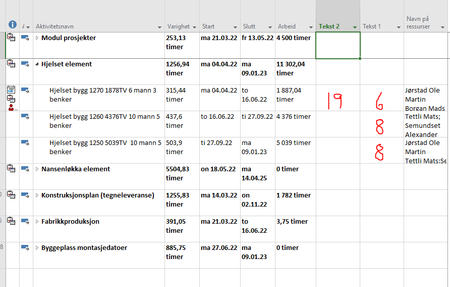
Someone know how to set up a new column to show me the number of assigned resources on tasks? In column Tekst 1 i have drawn numbers in red just for an example. And also i would like to have a colu...
 Mar 24, 2022Polestar2021,
You're welcome and thanks for the feedback.
What exactly do you mean by, "place out resources"? And I'm confused about you desire to show a list of resources not assigned to a task yet. At the top of the Resource Usage view you can see a list of unassigned resources but, those resources may or may not be appropriate for assignment to any given task.
With respect to removing decimals in the days column, if you simply want a whole number of days then replace the t.Text1 line with this:
t.Text1 = Format(t.Duration / 60 / ActiveProject.HoursPerDay, "##") & " days"
John

Vinod_Singh
Mar 28, 2022Copper Contributor
A very simple thing to remember
If your first equation you write to solve a problem is incorrect, no matter how many pages you fill your answer will be incorrect.
Same goes here. Most of them make a bad plan and start tracking without even building a plan.
Objective A
Criteria 1
Task a
Once all tasks completed milestone Criteria 1 should complete similarly criteria 2, 3 etc
Once all criteria completed then objective 1 is met,
Once all objectives 1,2 3 etc complete main event ie project is complete.
Once you have a dependency driven dynamic plan, baseline the plan with putting a deadline to see the critical path , assign resource, look for over allocation and do some levelling of resources then start tracking. Any changes made to incomplete tasks will push your all the subsequent tasks .
Then comes basic problems people assign resources to summary tasks it add extra works on top, people put dependency at summary tasks, it hides critical path , tasks are mostly in past not complete.
Once you resolve all these basis mistakes then your plan tells you so many things and you can better handle any project or program.
If your first equation you write to solve a problem is incorrect, no matter how many pages you fill your answer will be incorrect.
Same goes here. Most of them make a bad plan and start tracking without even building a plan.
Objective A
Criteria 1
Task a
Once all tasks completed milestone Criteria 1 should complete similarly criteria 2, 3 etc
Once all criteria completed then objective 1 is met,
Once all objectives 1,2 3 etc complete main event ie project is complete.
Once you have a dependency driven dynamic plan, baseline the plan with putting a deadline to see the critical path , assign resource, look for over allocation and do some levelling of resources then start tracking. Any changes made to incomplete tasks will push your all the subsequent tasks .
Then comes basic problems people assign resources to summary tasks it add extra works on top, people put dependency at summary tasks, it hides critical path , tasks are mostly in past not complete.
Once you resolve all these basis mistakes then your plan tells you so many things and you can better handle any project or program.
John-project
Mar 28, 2022Silver Contributor
Vinod_Singh,
Why are you responding to me? It's like preaching to the choir. I've responded to plenty of users, mostly first-time users of Project, but even some who supposedly have been using Project for some time, to help re-orient their thinking. One thing I always try to make clear, Project is neither intuitive nor easy to learn, despite what Microsoft literature may infer.
John
Why are you responding to me? It's like preaching to the choir. I've responded to plenty of users, mostly first-time users of Project, but even some who supposedly have been using Project for some time, to help re-orient their thinking. One thing I always try to make clear, Project is neither intuitive nor easy to learn, despite what Microsoft literature may infer.
John