Forum Discussion

Polestar2021
Mar 22, 2022Copper Contributor
Number of assigned resources on tasks
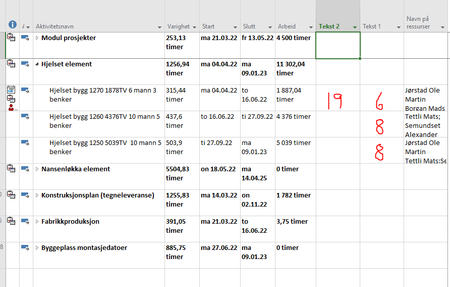
Someone know how to set up a new column to show me the number of assigned resources on tasks? In column Tekst 1 i have drawn numbers in red just for an example. And also i would like to have a colu...
 Mar 24, 2022Polestar2021,
You're welcome and thanks for the feedback.
What exactly do you mean by, "place out resources"? And I'm confused about you desire to show a list of resources not assigned to a task yet. At the top of the Resource Usage view you can see a list of unassigned resources but, those resources may or may not be appropriate for assignment to any given task.
With respect to removing decimals in the days column, if you simply want a whole number of days then replace the t.Text1 line with this:
t.Text1 = Format(t.Duration / 60 / ActiveProject.HoursPerDay, "##") & " days"
John

Polestar2021
Mar 28, 2022Copper Contributor
Thankx again for all answers. I still struggle using resource planner in MS project.
Maybe im doing wrong or maybe this dont suits our needs.
What is the best way for changing tasks for a resource. If i want a resource to work on one task for a week then change to another task?
And something must be wrong with my setup, because i have on task with 4500 hours and i have put 31 resources to that task. that will take 145 hours to finish. I have one more resource wich are on holiday and cant join task before in the middle of duration. The holiday is in his calendar. When i go to task and add him, MS project calculates the task to 207 hours!, so instead of shorter duration it makes the duration longer wich is totally wrong! Do you have any tip for what im doing wrong here?
Maybe im doing wrong or maybe this dont suits our needs.
What is the best way for changing tasks for a resource. If i want a resource to work on one task for a week then change to another task?
And something must be wrong with my setup, because i have on task with 4500 hours and i have put 31 resources to that task. that will take 145 hours to finish. I have one more resource wich are on holiday and cant join task before in the middle of duration. The holiday is in his calendar. When i go to task and add him, MS project calculates the task to 207 hours!, so instead of shorter duration it makes the duration longer wich is totally wrong! Do you have any tip for what im doing wrong here?

Vinod_Singh
Mar 28, 2022Copper Contributor
Managing a resource loaded plan is altogether a different skill level than an ordinary fixed duration plan.
There are many trips where one can go wrong and create so many issues than it can help with. I suggest making a better plan is more important than resolving the resource issue as that is applicable only if your tasks are really effort driven, which isn’t always the case.