Forum Discussion

Polestar2021
Mar 22, 2022Copper Contributor
Number of assigned resources on tasks
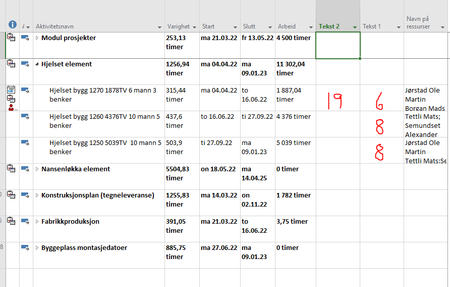
Someone know how to set up a new column to show me the number of assigned resources on tasks? In column Tekst 1 i have drawn numbers in red just for an example. And also i would like to have a colu...
 Mar 24, 2022Polestar2021,
You're welcome and thanks for the feedback.
What exactly do you mean by, "place out resources"? And I'm confused about you desire to show a list of resources not assigned to a task yet. At the top of the Resource Usage view you can see a list of unassigned resources but, those resources may or may not be appropriate for assignment to any given task.
With respect to removing decimals in the days column, if you simply want a whole number of days then replace the t.Text1 line with this:
t.Text1 = Format(t.Duration / 60 / ActiveProject.HoursPerDay, "##") & " days"
John

Polestar2021
Mar 25, 2022Copper Contributor
Thanks again!
If you see the pic i posted here. Im standing in the Ganth view where i have my tasks.
I was hoping i could add recources form here, and i can, but these lists i have found dont show recources
that is free(not added to any tasks. I have 60 recources, so the list is painfully long.
I know i can go to another view and sort columns so the free recources will be in top. I was just hoping
i could stand in Ganth view, find tasks and from there easy get available recources so i can add.
I can see im terrible to explain


Vinod_Singh
Mar 25, 2022Copper Contributor
This is applicable to project server, where resources are managed at organization level ( program or portfolio) . Where resources are allocated to different tasks and possibly to a different project , then project server will show you availability of all the resources and you can choose which one to assign, of course after approval and it reduces the availability of that resource automatically. In stand alone projects not all resource times dedicated to project related tasks hence best bet will be to update resources sheet and the individual availability then assign them to tasks, look for any over allocation and resolve that by resource levelling.