Forum Discussion

Polestar2021
Mar 22, 2022Copper Contributor
Number of assigned resources on tasks
Someone know how to set up a new column to show me the number of assigned resources on tasks? In column Tekst 1 i have drawn numbers in red just for an example. And also i would like to have a colu...
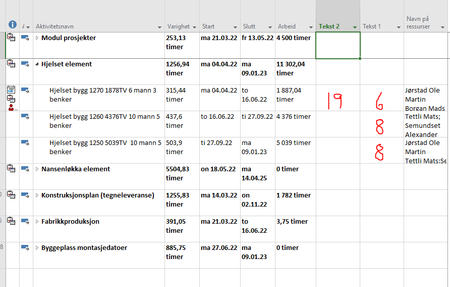
 Mar 24, 2022Polestar2021,
You're welcome and thanks for the feedback.
What exactly do you mean by, "place out resources"? And I'm confused about you desire to show a list of resources not assigned to a task yet. At the top of the Resource Usage view you can see a list of unassigned resources but, those resources may or may not be appropriate for assignment to any given task.
With respect to removing decimals in the days column, if you simply want a whole number of days then replace the t.Text1 line with this:
t.Text1 = Format(t.Duration / 60 / ActiveProject.HoursPerDay, "##") & " days"
John
John-project
Mar 25, 2022Silver Contributor
Vinod_Singh,
Did you read the original post? I don't think you did. The user is showing the Gantt Chart view and is asking for two custom fields in that view. If you've got a way to do that without VBA, I'm listening.
John
Did you read the original post? I don't think you did. The user is showing the Gantt Chart view and is asking for two custom fields in that view. If you've got a way to do that without VBA, I'm listening.
John

Vinod_Singh
Mar 25, 2022Copper Contributor
Yes I did read John.
There are many different ways to get your job done. He is looking for number of resource count to a task. I not only gave the count but it shows those name of resource count to a given task. You can hide the names and see only counting at summary. There are various views and filters and formulas and settings in MSP.
I have even put a complete risk register that each task you can associate a risk to it and expected delays due to that risk which can give you a original baselined Gantt view and a risk adjusted plan with possible delays.
You can add RAG signals to each tasks that will tell you whether a task is late .
You can filter late tasks, critical tasks etc.
No macro all there just need to be little patient and applying creative thoughts.
There are many different ways to get your job done. He is looking for number of resource count to a task. I not only gave the count but it shows those name of resource count to a given task. You can hide the names and see only counting at summary. There are various views and filters and formulas and settings in MSP.
I have even put a complete risk register that each task you can associate a risk to it and expected delays due to that risk which can give you a original baselined Gantt view and a risk adjusted plan with possible delays.
You can add RAG signals to each tasks that will tell you whether a task is late .
You can filter late tasks, critical tasks etc.
No macro all there just need to be little patient and applying creative thoughts.
- John-projectMar 26, 2022Silver ContributorVinod_Singh,
Yes you can do a lot of things with Project that aren't obvious to a new or casual user. However, sometimes you just can't get there from here without VBA (e.g. showing data in accounting months, custom reports for all resource exception days, full display of multi-line notes in a Task Sheet type view, etc.)
Your approach indeed shows another way to get a resource count by task. I chose a macro approach because that is the only way to give that count in a Gantt Chart view, as that's what the user requested. Over the many years (20+) I've been helping Project users find solutions, I generally attempt to employ filtering, grouping, sorting, or simple view formatting to address their question/issue but there are times when a simple (or complex) VBA approach is the better, or only answer.
Indeed, Project Server and now Project Online have greater capability in a enterprise environment but many user neither want or need the cost or complexity of those versions.
John Polestar2021Mar 28, 2022Copper ContributorThankx again for all answers. I still struggle using resource planner in MS project.
Maybe im doing wrong or maybe this dont suits our needs.
What is the best way for changing tasks for a resource. If i want a resource to work on one task for a week then change to another task?
And something must be wrong with my setup, because i have on task with 4500 hours and i have put 31 resources to that task. that will take 145 hours to finish. I have one more resource wich are on holiday and cant join task before in the middle of duration. The holiday is in his calendar. When i go to task and add him, MS project calculates the task to 207 hours!, so instead of shorter duration it makes the duration longer wich is totally wrong! Do you have any tip for what im doing wrong here?- John-projectMar 28, 2022Silver ContributorPolestar2021,
My first comment is that a plan that has that many resources assigned to a single task is either, a) to detailed with resources, or b) not detailed enough with respect to tasks.
So what does that mean? Let's say of the 60 available resources instead of 60 individual unique skills you actually have 20 of one compatible skill, 20 of another compatible skill, 10 of another skill and 10 individual resources with one-of-a-kind unique skills. Of those resources with compatible skills you may not care which individuals work on the task, they all have equivalent ability. For those resources you should consider creating group resources (e.g. Elect Engr, Mech Engr, etc.) where the Max Units for each group equals the number of individual members of the group. So, if the Elect Engr group has 10 people, the Max Unit value for the group is 100% x 10 or 1000%. This assumes a single Base Calendar for the group. Using group resources can greatly simplify resource utilization by not getting bogged down in unnecessary detail.
For part b) your plan may not be broken down in easily manageable tasks (i.e. it is structured at too high a level). Depending on the total span of the plan a good starting point is tasking in 2 to 4 week elements. That is, a single task should not span more than 2 weeks to a month. Although this may seem to expand the total scope of a plan, that expansion can be controlled by expanding only the near term effort (e.g. 6 months) while keeping future tasks as "planning packages" to be expanded as the plan progresses.
So yes, the very likely could be something wrong with your setup.
John