Forum Discussion

MS Project: Overallocation not showing in Custom View
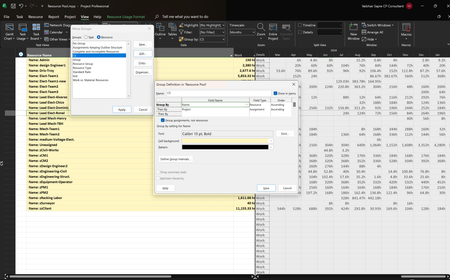

There are two aspects of resource overallocations that differ between the default Resource Usage view and the Resource Usage view grouped by resource and project name, which Vaibhav attaches.
The first difference is that the Overallocated Resource Name is not shown in red in the grouped view, and the second, also in the grouped view, is that the overallocated work values in the time phase are not shown in red.
For the first question, the Overallocated field serves precisely to identify what you are looking for, which is whether the resource is overallocated.
I have tried by different means to raise this value of Yes, (of course it is associated with the ungrouped resource, and has all its usefulness), to the title of the grouping at the level of the resource name, but it seems like an almost impossible mission.
In my conclusion, the two mentioned formatting characteristics in red are lost when grouping and I do not believe there is a method for them to appear.
Vaibhab, I think that the analysis you are looking for, so necessary and important, of reviewing the over-allocated resources in your different projects, you will have no choice but to do it from the Default Resource Usage view.
However, I give you some suggestions that can help you from the ungrouped view, and that you may already know.
Sort the Resource Usage table by project without grouping.
When you want to hide all assignments and show only the resource names, select the entire table (click on the top left corner), and select hide subtasks(Menú >View > Data > Show Outline > Hide Subtasks), or select the entire table and show all (... All Subtasks).
Insert the Overallocated column to filter overallocated resources.
You can include almost all of these options in the quick access toolbar, which will be very useful for this scenario.
Ignacio
 VaibhavSapreJul 11, 2024Copper ContributorThank you Ignacio_Martin for your investigation and a workaround.
Someone suggested not to use the Resource Pool to avoid this issue. Do you recommend using a single project file to hold 20+ sub-projects with no resource pool?- Ignacio_MartinJul 12, 2024Steel Contributor
- VaibhavSapreJul 12, 2024Copper ContributorThank you for your guidance Ignacio_Martin, I appreciate it!