Forum Discussion

VaibhavSapre
Jul 09, 2024Copper Contributor
MS Project: Overallocation not showing in Custom View
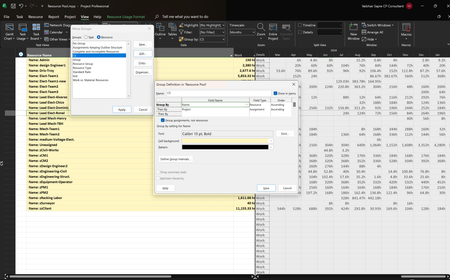
Hello, Thank you for reading this. I am using Microsoft Project Online Desktop Client MSO (Version 2308 Build 16.0.16731.20542) 64-bit. It is a Master Project with a Resource Pool. I have creat...

VaibhavSapre
Jul 10, 2024Copper Contributor
Thank you for your reply.
I tried your suggestion but it shows "No", while I know that resource is overloaded for a few months.

Jul 10, 2024
All -- The Overallocated field is entirely useless in this situation because the Overallocated field only displays a Yes value for tasks on which the resource is assigned more work on that task than Microsoft thinks they can do (such as assigning the resource to work 10 hours per day when their Max. Units value indicates they can only work 8 hours per day). The Overallocated field DOES NOT display a Yes value when the resource is overallocated across multiple tasks.
I think the reality is that when grouping is applied in the Resource Usage view, the red text disappears. The approach I uses is NOT using grouping. Instead, I insert the Project column and the Task Summary Name column, which tells me the projects in which the resource is overallocated, and the summary section in which the tasks are located. Just a thought. Hope this additional information helps.
I think the reality is that when grouping is applied in the Resource Usage view, the red text disappears. The approach I uses is NOT using grouping. Instead, I insert the Project column and the Task Summary Name column, which tells me the projects in which the resource is overallocated, and the summary section in which the tasks are located. Just a thought. Hope this additional information helps.
- VaibhavSapreJul 10, 2024Copper ContributorThank you for your suggestions Dale_HowardMVP.