Forum Discussion

MS Project: Import task from excel(.xlsx) to MS project it shows errors and incorrect information
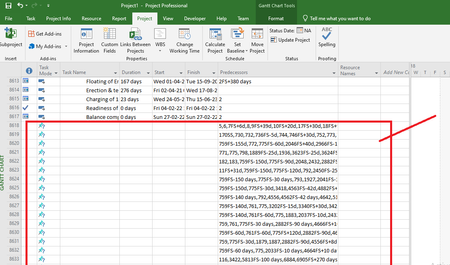

I assume one of the "errors" you refer to is the long list of predecessors. Attempting to import task links from Excel is difficult at best. Why? Because precisely identifying what the task ID will be in Project is not readily translate with row numbers in Excel.
There is not enough information in your post that gives us much clue as to what may be going wrong.
1. What type of import are you using (i.e. new project, insert, or merge)?
2. What fields are you importing?
3. Are you importing tasks, resources and assignments or just one or two of those elements?
4. You mention getting errors on import. What do the error messages say?
5. What exactly are you trying to do? Yeah, I know you are trying to import but give us some background.
John

1. We are using Append import. Because we need to set the custom project calendar and and project start date. We are also try this by setting up the project as new project , but it's also not working.
2. we are trying to import those fields such as,
| ID | Name | SUMMARY | Outline Level | DURATION | Start | Finish | Actual Start | Actual Finish | Successors | PREDECESSORS | % Complete | TASK MODE | Baseline Start | Baseline Finish | CRITICAL | Activity Type | CONSTRAINT_DATE | CONSTRAINT_TYPE |
3. Now we are importing tasks only.
4.
5. We are trying to do is ,we have some data about project. The project contains 8000+ tasks and it has task links. We need to calculate the time duration taken by project and each task.is that everything is going fine. But the bad thing is we cant import the excel to the MS Project with out any errors.
[we are attaching the excel file along with it]
https://wrenchsolutions-my.sharepoint.com/:x:/p/anandhan_j/Ee8bRemrZXRCtqARlnFHSdUBjjsMuoydSpkNzT_oEIy5tw?e=pQRAkm
- John-projectMar 24, 2022Silver ContributorAnanadhan_J,
Thanks for the detail information, that helps a lot in understanding your issue. Let me address your answers to my questions, starting with question 5.
5. I'm impressed with your Excel plan, it looks like it was created by Project and then dumped into Excel. Was it created in Excel or did it originally come from Project? If it came from Project, why can't you simply continue with what you had in Project? If it was created in Excel, why was it done in that application?
1. You are correct that creating a new project will give you the default Project calendar (Standard) and the Project start date will be the current date so pre-formatting a blank Project file and using Append is the correct approach when importing from Excel.
2. You are attempting to import way too many fields. In Excel all fields are user defined unless calculated by a formula but in Project many fields are calculated by Project based on other fields or specified criteria. For example, the Finish field is calculated from the Start and Duration fields. The Start field is calculated based on constraints or task dependencies. The Critical field is determined by the Total Slack field and an option setting. The Summary field is not user definable, it is set when the user indents/outdents to create a summary row. The ID field is set by Project and not user definable. There is no "Activity Type" field, if a custom field is needed, it must be imported as an extra field (e.g. Text1).
4. As I noted in my original response, attempting to import task dependencies is fraught with errors and that is demonstrated by the various error messages shown in your screen shots. Although you did include your Excel file (thank you), it is much to extensive for me to figure out the reason for each error, you will have to do that. Some things to look for are links on summary lines and a thorough review of errors highlighted during import. I realize that is a daunting task but I have no suggestions for shortcuts. You can however, eliminate links on tasks that are 100% complete as those are no longer applicable.
John