Forum Discussion

SteveDiaz
Aug 07, 2024Copper Contributor
MS Project does not produce the correct end dates on 5 tasks
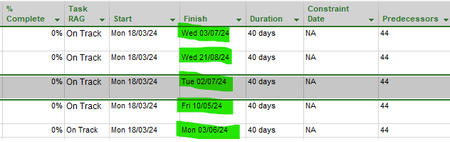
I have 5 separate tasks which all have the same start dates, same predecessor, same duration and all are 0%, with no Constraint dates with 5 different end dates.

SteveDiaz
Aug 07, 2024Copper Contributor
Dale_HowardMVP There are assign resources and no resource calendar. The task calendar is attached, but it would affect all tasks. These tasks are not the same but do have the same start dates and when I realised that the first date in the initial screenshot was wrong, I decided to change the other to see what would happen.... 5 different end dates. What other information would you like?

Aug 07, 2024
Steve -
Thanks for sending me the project in question. The Finish date problem is caused by task splits. The only task that does not have a task split (the ... in the task's Gantt bar) is task ID #54, which has the correct Finish date of May 10, 2024. All of the other tasks have one or two task splits. Why are those task splits there? If this is an accident, you can remove the split by clicking and holding the right-hand Gantt bar portion and then dragging it to the left until the Gantt bar portions are joined together without a split. Once I removed all of the task splits, the correct Finish date was displayed for every task. Hope this helps.
Thanks for sending me the project in question. The Finish date problem is caused by task splits. The only task that does not have a task split (the ... in the task's Gantt bar) is task ID #54, which has the correct Finish date of May 10, 2024. All of the other tasks have one or two task splits. Why are those task splits there? If this is an accident, you can remove the split by clicking and holding the right-hand Gantt bar portion and then dragging it to the left until the Gantt bar portions are joined together without a split. Once I removed all of the task splits, the correct Finish date was displayed for every task. Hope this helps.
- Aug 07, 2024Steve --
After I answered your question, I ran a batch of QA filters on the project in question, and there are multiple problems with your project. For example, you have task dependencies set on summary tasks. I would recommend you watch the following YouTube video and then download and install the quality filters I offer for free:
https://youtu.be/oidjqs_0EXg
Hope this additional information helps.