Forum Discussion

Linking a value in an Excel cell to a cell in Project
 Jul 22, 2021
You are using Paste Links to link Excel data to Project and I must warn you that paste links are fragile and prone to corruption. If they seem to be working for you I'd say you are very lucky.
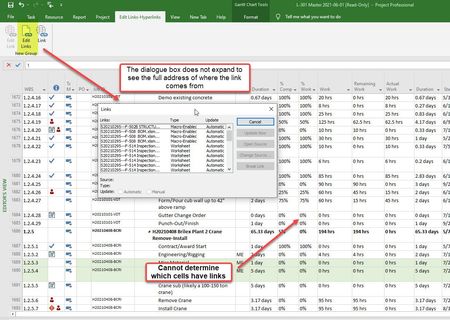
With paste links there is no clear method for seeing both "source" and "destination" in the Edit LInks window. You can click on a link in Project and hit "open source" and you will be shown which Excel cell is the source, but it's a "hunt and peck" process. It may be possible to automate a "seek and find" process with VBA but a much better way to accomplish what you are doing is with VBA itself (i.e. no paste links).
However, since you are only importing percent complete, have you tried an import map?
John
You are using Paste Links to link Excel data to Project and I must warn you that paste links are fragile and prone to corruption. If they seem to be working for you I'd say you are very lucky.
With paste links there is no clear method for seeing both "source" and "destination" in the Edit LInks window. You can click on a link in Project and hit "open source" and you will be shown which Excel cell is the source, but it's a "hunt and peck" process. It may be possible to automate a "seek and find" process with VBA but a much better way to accomplish what you are doing is with VBA itself (i.e. no paste links).
However, since you are only importing percent complete, have you tried an import map?
John

- John-projectJul 22, 2021Silver ContributorOkay, let me know if you need further help or, if I answered your question, please consider marking my response as the answer.
John