Forum Discussion

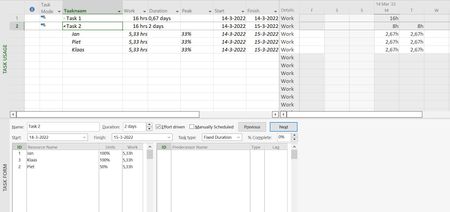
Fixed duration task / Effort Driven: Why is the 3rd resource set at 50% by Project?
 Mar 15, 2022
This "phenomenon" occurs when effort driven is checked (default) for a fixed duration task. The effort driven strives to keep the work content constant and you can see that in the Task Usage view as you assign each of the 3 resources consecutively.
Here's the interesting part. Instead of 3 resources, consecutively assign 4 resources at 100% to the task. As each resources is assigned you will see the Assignment Units replicate the previous resource's units while the Peak adjusts to maintain the constant work value. So for the second assignment, the assignment units is still 100% but the Peak reduces to 50%. Then when the third resource is assigned, the assignment units takes on the peak unit value from the first two assignments (i.e. 50%) and the peak now readjusts to be equal for all 3 assignments (i.e. 33%). If you assign a fourth resource, the assignment units takes on the previous peak (i.e. 33%) and the peak now readjusts to spread the original work content over 4 resources so it shows 25%.
Is this a good enough explanation for your "students"? Don't know, but it might make their heads spin a bit 🙂
I do recall there was a change to the way peak units are calculated, circa Project 2010 or Project 2013 (I think), but I don't remember the details. Whether that has anything to do with this issue, I don't know.
John

What is the Max. Units value for Piet? If you assign a resource to a task without entering a Units value, Microsoft Project will set the Units value to match the Max. Units value for the resource. Might that explain this mystery? Let us know and we will try to help you.

I know what you mean, that is the odd thing here. Max units is standard 100% like the other resources. All 3 equal. I just assigned them, no manual entering values.
Thanks for your help. Could you try and replicate maybe?