Forum Discussion

Extract Data with VBA in the Project
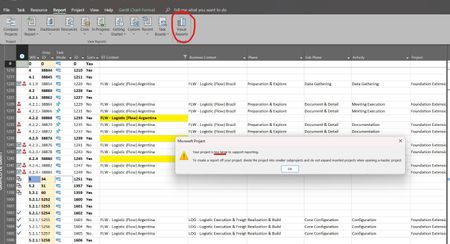

Thanks Ignacio_Martin, but this way it wouldn't help me copying (CTRL + C) and pasting into Excel. As I said before, I'm doing the extraction in a structured way by exporting to an Access database model available within Project. It already brings me all the structured tables, including some tables with granularity (days, weeks, months). However, as the schedule grows, it no longer allows exporting. I tried using VBA, but the method I used didn't export the "CubeDynamicCustomFieldTask" table, which is responsible for the custom fields.
In addition, the export of the MSP_EpmTaskByDay table already exceeds 1 million rows due to the weekly granularity.

TulioOliveira,
You can export any type of Project data to Excel (or Access) with VBA but it would have to be per task, resource and/or assignment instead of "en-masse" as a cube. I've written many macros that export all kinds of Project data to Excel.
Just curious, what Project fields are you trying to export?
John
- TulioOliveiraDec 23, 2024Copper Contributor
Hy John.
Thanks for written me. I want extract some fields Text and Duration. Total of 7 field custom. My model of data is granulated of weeks. If I extract for .XLSX, I loss it's granulated. The extraction for Excel, don't export this granulated, only .mdb.
Do you have some VBA code to share with me?
- John-projectDec 23, 2024Silver Contributor
TulioOliveira,
I have several macros that export various types of Project data to Excel but without more details about your file, I don't know which macro would be most appropriate. Please contact me at the address below, it will be easier to work one-on-one than through the forum.
I note you appear to be using an English version of Project. If you send me your file with details on exactly what data you need to export I can give you a better idea of what I can do. I will ask some questions.
John
jmacprojataticlouddotdotcom
(remove obvious redundancies)