Forum Discussion

End dates of Subtask are appearing wrong
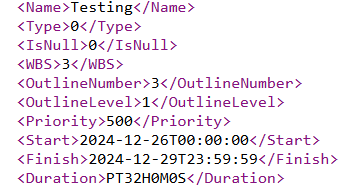
- Feb 04, 2025
Hello again Saleem
If you want the summary task to be independent of the subtasks it groups, you must include the following instructions in the corresponding summary task of the xml schema you want to import:
<ManualStart>2024-12-26T00:00:00</ManualStart>
<ManualFinish>2024-12-29T23:59:00</ManualFinish>
<Manual>1</Manual>The order and place in which they are within the task does not matter, even if there are <Start>... and <Finish>... instructions, because when defining the task as Manual, only manual dates will be considered.
You must write the instructions exactly as shown above, respecting upper and lower case.
You must also write the end date as: 2024-12-29T23:59:00 and not as: 2024-12-29T23:59:59, in which case it will skip to the next day and count one more day when importing the schema file.
Going back to your initial request, it would look like this:
<Name>Testing</Name>
<Type>0</Type>
<IsNull>0</IsNull>
<WBS>3</WBS>
<OutlineNumber>3</OutlineNumber>
<OutlineLevel>1</OutlineLevel>
<Priority>500</Priority>
<ManualStart>2024-12-26T00:00:00</ManualStart>
<ManualFinish>2024-12-29T23:59:00</ManualFinish>
<Manual>1</Manual>If you consider that it has been useful and sufficient, you can close the query by clicking Solved.
Ignacio

Hi Salee
I think you are applying the 24 Hours calendar to your project: In this case, it is usual to define 24 Hours per day in Options > Schedule, since it is very possible that you now have 8 Hours per day.
Note.- You must first modify this option and then enter the Duration of the tasks, it is not enough to change only to 24 h/d.
Note.- A tip if you already have many durations entered in your project, is to first copy the entire Duration column to the clipboard, then change to 24h/d, paste the Duration column, and finally put all the tasks in Auto scheduled Mode.
Note.- I recommend that the project is always, except for exceptions, in Automatic calculate (On), and all tasks in Auto Scheduled Mode.
Regarding your xml file, the Duration must be in hours, and since they are 1 and 3 days of 24h/d, they must be as follows:
Sub1:
<Duration>PT24H0M0S</Duration>
Sub1:
<Duration>PT72H0M0S</Duration>
I hope I have helped you and Happy New Year!

Well that did help a lot !
I was making mistake with calendar, set the values and now subtask dates are appearing as they should but this did not sort the end date of Parent task.
There's still an issue, Parent task "Testing" is supposed to be end on "12/29/24 11:59 PM" just like the rest of tasks in project but it is ignoring this set configurations
<Name>Testing</Name>
<Type>0</Type>
<IsNull>0</IsNull>
<WBS>2</WBS>
<OutlineNumber>2</OutlineNumber>
<OutlineLevel>1</OutlineLevel>
<Priority>500</Priority>
<Start>2024-12-26T00:00:00</Start>
<Finish>2024-12-29T23:59:59</Finish>
<Duration>PT71H59M0S</Duration>
heres how I days of week in calendar are configured
<Calendar>
<UID>1</UID>
<Name>Custom</Name>
<IsBaseCalendar>1</IsBaseCalendar>
<BaseCalendarUID>-1</BaseCalendarUID>
<WeekDays>
<WeekDay>
<DayType>1</DayType>
<DayWorking>1</DayWorking>
<WorkingTimes>
<WorkingTime>
<FromTime>00:00:00</FromTime>
<ToTime>23:59:00</ToTime>
</WorkingTime>
</WorkingTimes>
</WeekDay>
and this is my project level calendar configuration
<DefaultStartTime>00:00:00</DefaultStartTime>
<MinutesPerDay>1439</MinutesPerDay>
<MinutesPerWeek>10079</MinutesPerWeek>
Is there something I am missing here ? Thanks in advance for help
- Ignacio_MartinJan 08, 2025Steel Contributor
Hi Salee
A 24 hour day is 1440 minutes (not 1439)
The calendar configuration in the xml file should show 1 more minute:
<FromTime>00:00:00</FromTime>
<ToTime>00:00:00</ToTime>
<MinutesPerDay>1440</MinutesPerDay>
And a 24 hour per day task if it starts at 0:00 should end at 0:00
So in the xml file it should also show 1 more minute:
<Start>2024-12-26T00:00:00</Start>
<Finish>2024-12-29T00:00:00</Finish>If this does not fix the problem, please show an image with the Indicators column below the Id column.
I hope you find it useful.
Ignacio
- saleemullah054Jan 09, 2025Tin Contributor
Hi there !
I want my task to end at 23:59 on its end date so thats why minutes per day are set to 1439 and hence
<FromTime>00:00:00</FromTime>
<ToTime>23:59:00</ToTime><MinutesPerDay>1440</MinutesPerDay>and
<Start>2024-12-26T00:00:00</Start>
<Finish>2024-12-29T23:59:00</Finish>This is working for every task except for task which has subtask in it like the one shared above "Testing". I want the same thing for this task too but somehow it is not applying on it and thats what I want help with
 John-projectJan 09, 2025Silver Contributor
saleemullah054,
Just for reference, the Minutes per day setting is a calendar setting NOT a task setting. It is used by Project to define how a "day" is shown in the Duration field and for a 24 hour day, it is 1440 minutes as Ignacio pointed out.
However, with your task start and stop times, the duration will still show as one day due to rounding. I suggest you fix that calendar issue and then see how things play out.
John