Forum Discussion

mohd123
Aug 16, 2023Copper Contributor
Deploying Project for the web
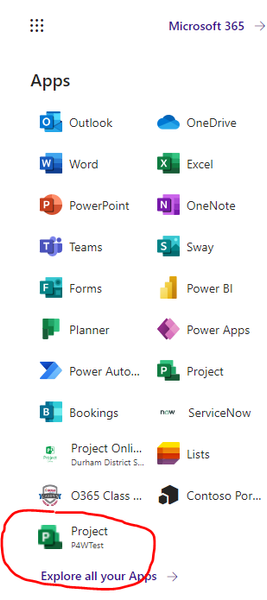
Hi, I recently deployed the Project Accelerator in the non-default environment named "P4WTest" (Type is Sandbox). I am able to see a new app in my list of Office apps as shown below. I then shared ...


mohd123
Aug 17, 2023Copper Contributor
I verified with my team, there's no restriction on who can see Project apps. The documentation says: "Users with the Project User and Project Common roles will see the Project app tile appears in https://www.office.com/
Here are security roles assigned to an Azure group as per above:
In my case, I have the "System Administrator" and "System Customizer" role for the model-driven Power App, also the tile shows up in my list of all apps. I expect the same for my team members who are part of that Azure security group. As a test, I also individually added the group members and gave them the same roles "Project User" and "Project Common" but they still do not see it as a tile.

RodFromm
Aug 17, 2023Steel Contributor
In our environment the ability to see the tiles has nothing to do with the roles assigned within P4W. I would expect this to be the same in your environment. Get with your sharepoint admin and see how they have it configured.