Forum Discussion

Deploying Project 2016 C2R (Insider) on Terminal Server doesn't show new features
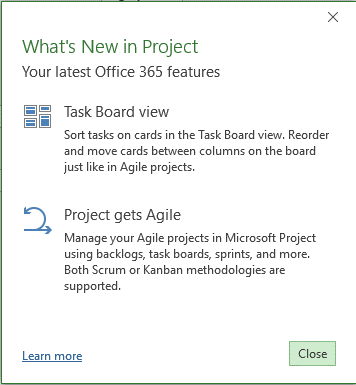

Is that C2R-P you are running Trutz, or the true subscription product? The 'about' page looks like Project Professional 2016 and not Project Online Desktop Client. Which version do you see of the winproj.exe executable directly?
Also have you closed and opened again - and did you see a license acceptance on the first start? I have seen where the new features don't light up until after a restart of Project after having accepted the license. Also if you are connected to Project Server 2013/2016 you will not see the features, but it feels more like a non-subscription product, but it did show you the 'What's New' which seems to conflict.
If none of that helps, can you share the configuration.xml file you used to define your ODT installation?
Best regards,
Brian.

Hi Brian,
I used the standard Office Deployment Toolkit, see also the configuration.xml quoted:
<Configuration>
  <Add OfficeClientEdition="64" Channel="InsidersFast">
    <Product ID="O365ProPlusRetail">
      <Language ID="en-us" />
      <Language ID="de-de" />
    </Product>
    <Product ID="ProjectProRetail">
      <Language ID="en-us" />
      <Language ID="de-de" />
    </Product>

	</Add>

  <Updates Enabled="TRUE" Channel="InsidersFast" />
<Display Level="None" AcceptEULA="TRUE" />
<Property Name="SharedComputerLicensing" Value="1" />
</Configuration>
The WinProj.exe located in C:\Program Files\Microsoft Office\root\Office16 states the following version: 16.0.8730.2074
The license acceptance doesn't come up due to the Remote Desktop installation setting:
Display Level="None" AcceptEULA="TRUE"
I was asked to enter the O365 User Account during first run though.
I started the client connected to a POL tenant in first release for all users.
Thanks for your help
Trutz
- Brian-SmithNov 22, 2017Former Employee
That all looks perfect Trutz. Do you see the same if you start standalone? It should work either way. I'll also try installing with your configuration.xml settings and see what happens.
Best regards,
Brian.
- Trutz_StephaniNov 27, 2017Steel Contributor
Hi Brian,
Did you have the chance to test the installation?
Maybe it is linked to the fact that the O365 activation on Terminal Server is not registered against the 5 regular installs that come with a subscription. At least that I noticed that the Terminal Server activation is not listed for the given account under "Install status" in the O365 portal (which is expected behavior from what I've read).
Kind regards,
Trutz
- Brian-SmithNov 27, 2017Former Employee
I haven't yet Trutz, busy over the holiday weekend/weeks. I suspect you are correct, as I have seen the features not light up until you have opened and accepted the license then restarted - ti feels like that isn't happening in this virtual environment. Is there a support case open?
Best regards,
Brian.
- Trutz_StephaniNov 22, 2017Steel Contributor
Yes, it looks the same if I start the "Computer" profile.