Forum Discussion

Ximo
May 01, 2022Brass Contributor
Converting Actual Duration to Hours
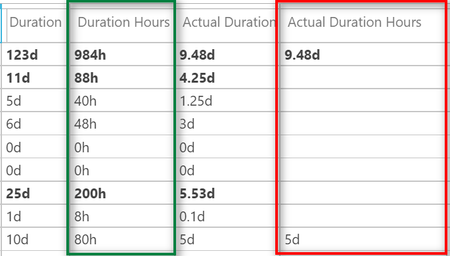
Hi all, I have been able to convert [Duration] to hours with the formula: ProjDurConv([Duration], pjhours) And I am displaying correctly the new column (Duration Hours): I am trying to do...
 May 01, 2022Ximo,
I don't understand what any of this has to do with timescaled data. The tasks should be set up as Fixed Duration type and estimated (not actual) effort entered into the Work field. I 'm not sure how the PM knows ahead of time what the actual work will be because until it actually happens, everything is an estimate.
I don't use Project Online nor do I use Power B1, so the statements in your last paragraph are beyond my scope. However, the fields you talk about (i.e. Duration, Work, Actual Work, Remaining Work, etc.) are all readily available for dashboard type reporting, no conversions necessary.
John
John-project
May 01, 2022Silver Contributor
There is nothing wrong with your formula. This is what I get with Project 2019 Pro with:
Text2=ProjDurConv([Duration],pjHours)
Text3=ProjDurConv([Actual Duration],pjHours)
I suspect the issue has to do with check in and publishing, or it's possible your file has some corruption. You might try saving the file as XML and then re-open the XML in Project.
John

Ximo
May 01, 2022Brass Contributor
Thank you John-project, I see that you are using Task2 and Task3 fields as Text type, in my case the column Actual Duration Hours was type Duration because later on I was trying to use this field in the time phased datasets in the Project Online PBI Content Pack.
If I use the type Text it works but would a text type custom field work in the time phased datasets?
Thank you
- John-projectMay 01, 2022Silver ContributorXimo,
Results are the same? Does that mean it works when you use custom Text fields?
Keep in mind that the duration type in Project is in minutes (internally), regardless of how it may be displayed.
John- XimoMay 01, 2022Brass ContributorUsing Text type works, my goal with Duration type was to see this column data in the time phased data but according to this:
https://social.technet.microsoft.com/Forums/ie/en-US/40f6d796-270a-484f-91d9-54dcc3f8e6f1/custom-cost-cost1-fields-to-timephased-view-in-task-usage?forum=projectprofessional2010general
It is not possible, so maybe I need to stick to Text type anyway.- John-projectMay 01, 2022Silver ContributorXimo,
As noted in the referenced post, no custom fields (e.g. Text, Duration, etc.) are timescaled so Text type won't work either.
John
If your goal is to convert the Duration field to hours
John