Forum Discussion

BlissL
Sep 11, 2022Brass Contributor
Change date formatting for PWA
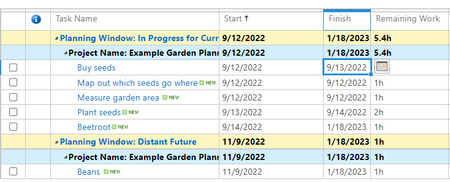
Hi there, I'm wondering how to change the date format for task lists in PWA. Following a quick google, I have tried to follow the instructions in this link, by changing the personalised ...
- Sep 12, 2022BlissL --
Your screenshot is showing the Tasks page in PWA, so I assume this is where you want the date formatting to be applied. First of all, the Project Online application administrator cannot set the date formatting for all users on this page, so each user will need to do this him/herself. To change the date formatting on the Tasks page, click the Tasks tab at the top of expand the Tasks ribbon. In the Display section of the Tasks ribbon, click the Units pick list button, select the Date item, and then select the desired date formatting on the flyout menu. Keep in mind that PWA only offers eight date formatting options. Hope this helps.

Sep 12, 2022
BlissL --
Your screenshot is showing the Tasks page in PWA, so I assume this is where you want the date formatting to be applied. First of all, the Project Online application administrator cannot set the date formatting for all users on this page, so each user will need to do this him/herself. To change the date formatting on the Tasks page, click the Tasks tab at the top of expand the Tasks ribbon. In the Display section of the Tasks ribbon, click the Units pick list button, select the Date item, and then select the desired date formatting on the flyout menu. Keep in mind that PWA only offers eight date formatting options. Hope this helps.
Your screenshot is showing the Tasks page in PWA, so I assume this is where you want the date formatting to be applied. First of all, the Project Online application administrator cannot set the date formatting for all users on this page, so each user will need to do this him/herself. To change the date formatting on the Tasks page, click the Tasks tab at the top of expand the Tasks ribbon. In the Display section of the Tasks ribbon, click the Units pick list button, select the Date item, and then select the desired date formatting on the flyout menu. Keep in mind that PWA only offers eight date formatting options. Hope this helps.

EricBeaulieu
Jan 20, 2025Copper Contributor
Dale That is not true.
BlissL ask your SharePoint Administrator to change the Regional Setting of your PWA site. The same way as any other SharePoint sites. https://yourtenantname.sharepoint.com/sites/YourPWASite/_layouts/15/regionalsetng.aspx