Forum Discussion

Blank Report Notes View
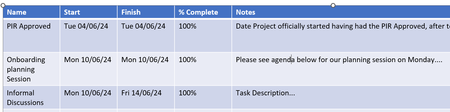

Alternatively, you can use the Text1 field for short notes. Chr(13) inserts the character for CR (carriage return) so that the text after it continues on the next line.
This is kind of like hitting <Alt>+<Enter> in MS Excel's entry bar.
 Caz45Jul 19, 2024Copper Contributor
ismet_kocaman How can I add the Text1 field please?
- ismet_kocamanJul 19, 2024Brass Contributor
- ismet_kocamanJul 19, 2024Brass Contributor
The picture attached shows how to add Text1 to the existing task table in the graphical report. But pls note that transferring task notes to the Text1 field for multi-line display would be feasible if you want to do this just for a few tasks or for the project summary task only. Otherwise, creating formulas and updating the text would be a tedious job to do. I would rather insert a separate text box and fill it with information.
 John-projectJul 17, 2024Silver Contributor
Are you talking to yourself? Quite an array of options. I just hope carysharfoot is taking it all in.
John
- ismet_kocamanJul 17, 2024Brass Contributor
Hi John,
No, I am not. I never found out anything by listening to myself.
Options are for all the users visiting the forum as someone may find them useful.
Regards,
Ismet