Forum Discussion

Updating Classic Calendar with Flow error
- Jan 21, 2020
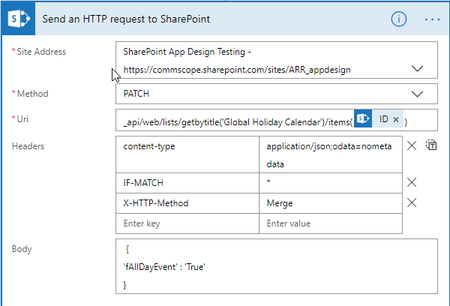
I think the problem is you need to include the start and end date/times in the body of your http request.
Please take a look at https://www.anupams.net/send-meeting-invites-sharepoint-online-calendar/
Hope this helps.

I think the problem is you need to include the start and end date/times in the body of your http request.
Please take a look at https://www.anupams.net/send-meeting-invites-sharepoint-online-calendar/
Hope this helps.
 BejeweledOneJan 22, 2020Brass Contributor
Terry_McCullaghI was able to get it working.
After I added the part to update the Start and End times, I was getting other errors.
I was able to resolve it by passing 2 dates from the PowerApp to the flow.
Date #1 is the standard DatePicker value for use in the Create Item action. Date #2 is a specially formatted date that is used in the Send HTTP Request action.
I had to format date #2 in PowerApps like this: {EventDate: Text(dpDate.SelectedDate,"[$-en-US]yyyy-mm-ddThh:mm:ss")}
That resolved it. Thank you for pointing me in the right direction.
- Terry_McCullaghJan 23, 2020Brass ContributorYou're welcome!
- BejeweledOneJan 21, 2020Brass Contributor
Terry_McCullaghThat certainly seems to be the case. I hate to be the noob, but in this case I am.
I am having an issue with formatting the date in the HTTP action. I presume I need to use the Start and End date from the newly created item, but can't seem to get the formatting correct. It's the first time I have tried used the expression builder to format it and what I have now is giving me the error:
You may break your PowerApps triggered flow with the changes on the triggers. I *think* I can safely say that it's referring to the triggerBody part of the statement, but I am not really sure how to fix that..