Forum Discussion

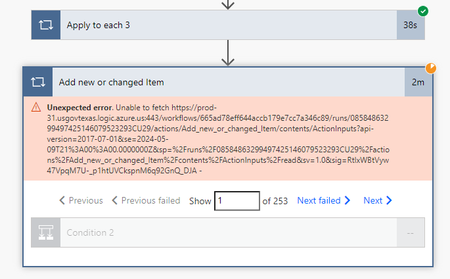
Unexpected error. Unable to fetch

What is the trigger, what type of data do you collect and how do you collect it?
When you run for each (I see you have three loops). What do you do within each for-each loop?
There seems to be conditions used, what are the conditions for the flow to continue?
 Sergento79May 10, 2024Copper ContributorThank you for replying.
I will try to answer to the best of my ability, as I am new at this and followed a video.
The trigger is Manual Run or Test flow
The data is in Excel sheet all columns are single lines of text except the date column. And I used ISO 8601 for date format. It uses Intersection Var Array to see if Item is there and writes it to list. I will watch the video again on the explanation and hope to come up with a better answer to your questions. btw the video is on youtube if interested https://www.youtube.com/watch?v=aNoPNcXIg08&t=10s Date format is the only thing I did not incorporate in my flow as it worked by changing it to ISO 8606 in list rows present in table.
I just dont understand why everything works as intended if under 50 items. And it still writes 95% if over 50.- May 12, 2024Hello again,
Thank you for the detailed description. This video seems to be a part 2 out of 3. Are all three videos released? have you followed them as shown in the video, or have you made any customizations?
Is there a reason you would like to work in Excell first and then have a script to update it in SharePoint Online? Because, if you could consider working from SharePoint first, there is a standard function to export to Excell.- Sergento79May 13, 2024Copper Contributor
ArefHalmstrand Hi thank you for getting back. Yes, it is a 3 part. 1 st shows what it does, 2nd describes the flow, and 3rd step by step follow. And I did not modify it except for Date formula.
I work with Excel because I extract info from multiple excel files I receive and do a series of merges and formulas with other files to come up with a single excel file as a db.
I've discovered an interesting situation with my flow. I noticed that it randomly fails random items to create. Each run/test fails different items and different number of them. In 3 last tests I had 1st produced 3 failed items, 2nd test 9, and 3rd 5. Failed items were never same items from previous fails. It feels like like SP make a connection to that excel file (SP documents or OneDrive) and randomly fails to connect to it. Attaching screenshots.