Forum Discussion

rwittels
Feb 02, 2021Copper Contributor
Sharepoint list creation from Excel breaks my dates
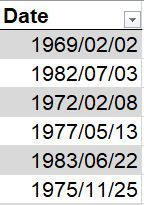
I am trying to create a list on Sharepoint to be used in Power Automate. My Excel list has the dates column formatted as date only and as yyyy/mm/dd: When I create a new Sharepoint list fro...
 Feb 08, 2021
This fixes the output but really ridiculous that I have to do this workaround.
formatDateTime(addDays(outputs('Compose'),1), 'M/d')
rwittels
Nov 15, 2021Copper Contributor
Hi. Don't worry about the JSON. I import my list and leave it with one day missing on each date. I correct the dates in my automation with the formatDateTime line.

SergDol
Nov 18, 2021Copper Contributor
rwittels I also faced the same issue and had to change dates in the source excel file before import to the SharePoint list
- rwittelsNov 19, 2021Copper ContributorI did that originally but decided that it was easier to leave my Excel file alone and just correct the imported dates with the addDays function in my code. It saves time.