Forum Discussion

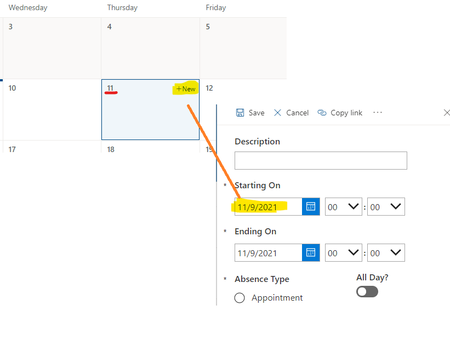
PowerApps Form Default Date as Selected Date from Calendar View

Thanks, Jeff_Lacarte. That's close to what I did too, although what I updated was the hour dropdowns instead of the Start and End datacards (00:00 to start and 23:59 to end when the toggle is on).
What I didn't like with the whole time selection idea though is that the hours and mins. are in separate dropdowns. Since this is for an absence tracker, I don't really need all the hours and all the mins, at least in our case. It's more like half-hour intervals. Also, when requesting time off in a normal schedule, that'd mean 6:00-18:00 max.
So what I did was change the Hour dropdown Items values to half-hour intervals:
(DataCardValue9 is my "All day Toggle)
Start
If(DataCardValue9.Value;
["00:00"];
["06:00";"06:30";"07:00";"07:30";
"08:00";"08:30";"09:00";"09:30";
"10:00";"10:30";"11:00";"11:30";
"12:00";"12:30";"13:00";"13:30";
"14:00";"14:30";"15:00";"15:30";
"16:00";"16:30";"17:00";"17:30";
"18:00"])
End
If(DataCardValue9.Value;
["23:59"];
["06:00";"06:30";"07:00";"07:30";"08:00";
"08:30";"09:00";"09:30";"10:00";"10:30";
"11:00";"11:30";"12:00";"12:30";"13:00";
"13:30";"14:00";"14:30";"15:00";"15:30";
"16:00";"16:30";"17:00";"17:30";"18:00"])
That way I could do this in the Hour Default value:
Start
If(DataCardValue9.Value;
"00:00";
Text((Parent.Default)
;DateTimeFormat.ShortTime24))
End
If(DataCardValue9.Value;
"23:59";
Text((Parent.Default);DateTimeFormat.ShortTime24))
I also got rid of the Mins. dropdown and change the Start and End datacards' update value to:
Start
DateValue1.SelectedDate
+ Time(Value(Left(HourValue1.Selected.Value;2));
Value(Right(HourValue1.Selected.Value;2)); 0)
End
DateValue2.SelectedDate
+ Time(Value(Left(HourValue2.Selected.Value;2));
Value(Right(HourValue2.Selected.Value;2)); 0)
In the end, it looks something like this:
I decided not to hide the time dropdown when the toggle was on, so it looks like this when it's selected:
I guess I tend to overexplain too 

 PxlNov 24, 2021Copper ContributorDid you ever find a way to do it through PowerApps? Trying to do the same thing and not finding a method that works, I think the answer is somewhere within InputTextPlaceHolder but I cannot find anything that makes it select based on what the user chooses
- Jeff_LacarteNov 25, 2021Brass ContributorUnfortunately no, not yet.
 GisleleMar 09, 2022Copper ContributorI am searching for the exact same solution, I would love to find a way to do this. Did you have any improvement on finding a way to do it in the past few months Jeff?