Forum Discussion

Active_Array
Jun 17, 2022Copper Contributor
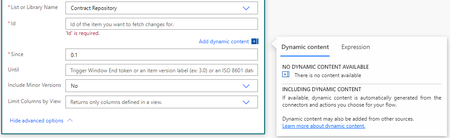
No Dynamic Content Available
Hi everyone, I'm new to Power Automate and my use case for this flow is to send a notification email when a SharePoint document library column changes state. I understand the steps and logic bas...

NZHP_Office_Manager
Apr 18, 2023Copper Contributor
Hi,
Very new to all this, total beginner.
I'm having a similar problem with a variation.
Some of the dynamic content for my trigger Add a row to a table is available, but the rest isn't?
They just aren't in the drop down options at all.
How do I create the dynamic content? You mention adding values? what does that mean?
Thank you

Micca0815
Nov 02, 2023Iron Contributor
There might be a few situations where the dynamic content list is not reflecting all attributes, like e.g. a nested apply to each.
You might want to tackle those either by using
a Parse JSON action for the response
(run the get response once, copy the output for the schema from example, repeat in case the questionnaire gets modified, dynamic content will be available, but null values could become tricky to deal with),
or put the response into a compose action.
For the latter you can then point to each response value with the expression outputs('NameOfComposeAction')?['WhichEverValueName'],
but it would not show up as dynamic content, though.
You might want to tackle those either by using
a Parse JSON action for the response
(run the get response once, copy the output for the schema from example, repeat in case the questionnaire gets modified, dynamic content will be available, but null values could become tricky to deal with),
or put the response into a compose action.
For the latter you can then point to each response value with the expression outputs('NameOfComposeAction')?['WhichEverValueName'],
but it would not show up as dynamic content, though.