Forum Discussion

Maximum requests users with seeded license + Premium license can do in power platform per day

vlecerfThanks for your helpful reply. i already read those articles but i could not get a clear number mainly for:-
1) using Power Automate premium license >> how many requests per 24 hours on Power Apps & Power automate?
2) using Power Apps premium license >> how many requests per 24 hours on power Apps & Power Automate?
3) using seeded license through E3 >> how many requests per 24 hours on power apps & power automate?
did you find those exact numbers?
What i have concluded is :-
From this sentence is that Users with E3 will have 6K requests per 24 hours.:-
while users with Premium license will have up to 40K:-
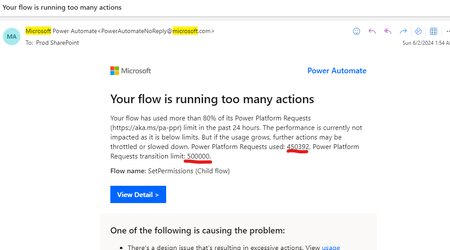
While from the email we got from Microsoft they mentioned that the limit for our user who have Power Platform premium license is 1/2 million requests and not 40K :-
so that why i am totally confused on those numbers..

500k coming form the transition period limit i think Requests limits and allocations - Power Platform | Microsoft Learn
As you can see, all organizations are currently in a "grace" period and limits are higher than offical limits.
License name PPR official limit per 24 hours PPR transition period limit per 24 hours
| Power Automate Premium | 40k per user | 200k per cloud flow |
| Power Automate Process | 250k per license | 500k per license |
| Power Automate Hosted Process | 250k per license | 500k per license |
| Power Automate Per-user plan (legacy) | 40k per user | 200k per cloud flow |
| Power Automate Per-flow plan (legacy) | 250k per license | 500k per license |
| Power Automate Free | 6k per user | 10k per cloud flow |
| Office 365 | 6k per user | 10k per cloud flow |
| Power Apps Premium | 40k per user | 200k per cloud flow |
| Dynamics 365 professional | 40k per user | 200k per cloud flow |
| Dynamics 365 Enterprise applications | 40k per user | 200k per cloud flow |
| Dynamics 365 Team member | 6k per user | 10k per cloud flow |
I think this can explain the difference between official numbers and number you get in mail notification.
This mean, that you have to find the correct licensing way based on below table but on the official limit and not on transition limit.
Otherwize you will get probably some issues once the transition period ended.
Rgds,
Valentin
- johnjohn-PeterOct 17, 2024Steel Contributor
Thanks for the table and the very helpful replies i got from your side, now numbers are easy to find, but hard to understand (Microsoft documentation fails again).. now the service account i am using has these licenses:-
From your table the service account should have officially 40K .. so Microsoft gave this account 500K during the grace period .. so i got 460K additional requests per day? or the service account i am using has more than 40K as an official requests?
Second question, when this grace period ends, so we can prepare ourselves in advance ?I am not sure why Microsoft is so mean in providing information about this..
Can you advice more on this please?
- vlecerfOct 17, 2024MCTLimits are defined depending on the service you consuming (dataverse, api, flow...)
Like for powerautomate according to the table you get 500k request.
https://learn.microsoft.com/en-us/power-automate/limits-and-config
Please check other applicable limits for more info
https://learn.microsoft.com/en-us/power-platform/admin/api-request-limits-allocations
Meaning that in you case you get the transition limit provided by microsoft on you flows.
Yes sure, Microsoft working on admin center reporting to give customer analysis on consumption (currently in preview)
Apparently they planning to turn limit on once this tool is released everywhere. But i think also, you will have a grace period as described in the documentation "to give you the opportunity to identify your needs".
Depending of your need and usages, two situations:
- Your consumption is ok accordingly with limit and not alerts on that then no impact
- If you consumption is higher that the limit, you will have to adopt the correct licensing depending of your needs. (can be premium licence, can be Add-on pack to get more request, Pay as you go model...)
Hope is more clear for you,
Valentin- johnjohn-PeterOct 17, 2024Steel Contributor
Thanks again.
So my service account has an official request limit of 40K ??? and i am currently given 500K during grace period? is this our current case?
Now on average my service account consumption is around 55K per day for all days (except weekends it can go down to 20K) and can go up to 150K on the first 2 days of each month, since we have a lot of work orders been automatically generated for us on the first 2 days of each month,,, so what could replace our current Power Automate Premium license to have more requests?