Forum Discussion

 Microsoft
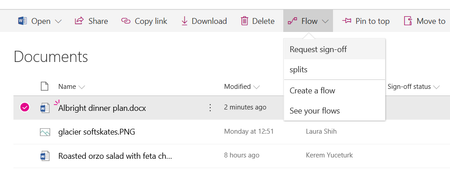
Introducing "Request sign-off" - an approval flow that requires no set up
 Microsoft
Hi Konstantin Kazantsev, thank you for this valid feedback.
Request sign-off is basically automating the steps of the current user setting up columns manually, and recording approval status in those places. You are correct that ideally, it would record the update with the name of the approver, but that's not possible with Flow approvals yet. We hope we get to that capability in the future.
For your second request, we do hope to add that history in a panel in a future release.

Kerem Yuceturk Regarding this comment - You are correct that ideally, it would record the update with the name of the approver, but that's not possible with Flow approvals yet. - have any improvements been made yet to be able to see who approved the document?
 Jer HarwoodOct 28, 2019Brass Contributor
Macha1976, Kerem Yuceturk - You can create your own Flow to record the approver and their comments. It's just another couple of steps than the template Flow with an additional column to write the results to. The out of the box Flow (referenced in this thread) is more of a convenience without having to create a custom Flow.
 Andrew WooOct 31, 2019Brass Contributor
Can the column for approval status be locked or it can be tempered?
- Jer HarwoodNov 01, 2019Brass Contributor
Andrew Woo - For the SharePoint savvy it can be changed when the list/library is in quick edit mode (it is just a single line of text column), but it doesn't show up as a field in the form when editing the metadata.
- Macha1976Oct 31, 2019Copper Contributor
Jer Harwood Thanks Jer, going to ask my IT contact if he can help me, appreciate the info.