Forum Discussion

 Microsoft
Introducing "Request sign-off" - an approval flow that requires no set up
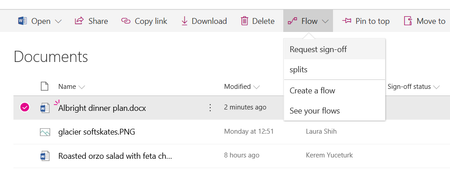

All - I received an update from the Microsoft support engineer today asking me to test the Request Sign-Off Flow in my environment and I'm glad to say that it is now working again. Why it took over two months to fix is a mystery but at least it's working and hopefully it stays that way so we can confidently share this nice feature with our colleagues, clients and users.

Jer Harwood That's great news! I just tested this so I can close out the planner item I have and it's only half there. A list I created last week - I did a request sign-off for the first time today, so it created the flow and it worked. Great!
Then I tried in on the original list where the lock occurred - failed. I turned off the approval function, and even deleted the sign off column. Reinstated signoff and tried again, and still failed.
I'm not sure if the fix isn't all the way in, or it's something in this list that causes the lock (one column has formatting, where the working list has none). Guess I'll have to leave my test open for another week to see if it gets better.
- Robin NilssonApr 08, 2019Bronze Contributor
Jer Harwood No minor versioning, these are lists, not libraries. However, I did check both lists for versioning. The list that works is on a communication site and has NO versioning setup. (Only because I forgot to set it up). The non working list is in a team site and has the standard versioning setup.
Im trying to test if that is the cause. I’ve turned on versioning on the working list. The signoff still works on my list in my comm site with versioning on.
And yes, same symptom. Approval email comes through saying ‘approved but cannot update ststus because of lock’.
So not sure what that tells me.
List versioning doesn't seem to break it.
List in communication site works, original list in team site doesn't.
Doesn't seem to matter if you do your approval from the forms app on a phone or from the email sent.
Newly created list in team site works. Now that is interesting. Either something is different in creating a new list, or it's the formatting on a column.
Testing formatting a column - that's not it, signoff still works.
So for me, if a list has a broken signoff where the status won't update (due to lock), it won't work every again. Recreate the list, it will most likely work. Which isn't an option obviously.
- Jer HarwoodApr 08, 2019Brass Contributor
Robin Nilsson - That is curious. I tested it in a couple site collections before posting as I wanted to make sure it was working in a handful of different scenarios I have tested before with. Do you have major and minor versioning by chance? It doesn't work with that configuration. Is it the same issue, stating the file was locked and not updating the status?