Forum Discussion

 Microsoft
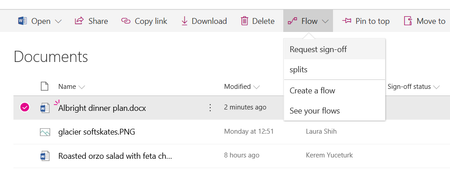
Introducing "Request sign-off" - an approval flow that requires no set up

I did what Jim Duncan suggested and it still failed. I received the email stating that it has been approved but it can't update the "sign-off" column. How do I change the status manually? And will the issue be corrected on it's own, eventually.

In my experience , no, the column does not get updated eventually.
- Colm CounihanFeb 28, 2019Iron Contributor
I'm back doing some testing on this again today just to see if anything has changed.
I attended #msignitethetour (in London) and I noticed that "Request sign-off" was included in one of the slide-decks. It was briefly mentioned and they didn't demo the flow end to end ( perhaps luckily for them .. but i was hoping that I would at last see it working)
The presenter suggested that I raise a ticket for this. Personally, I was surprised that this issue wasn't in more common knowledge by now . I can only assume that it's not causing issues for all users (or that adoption has been low and there hasn't yet been a support ticket raised for this)
Has anyone else raised a support ticket for this?
Also, I note that a guest user added to my SharePoint site (an MSA without an O365 licence) , is able to see the "flow" menu and can see "request sign off" on the drop down. However , they are unable to trigger the "request sign-off" flow from the Document library . An error message displays in the Details pane (see attached)
Also I note that a licenced user can not direct the "request sign off" flow to the guest MSA account.
What is the by-design position here. Are MSA guest users unable to interact with Flows unless they have O365 licences (in this case it would be better to hide the Flow menu perhaps?)
 Jer HarwoodFeb 28, 2019Brass Contributor
Colm Counihan wrote:Has anyone else raised a support ticket for this?
See above post - still no response since that update from MS Support.
 Judi StewartMar 28, 2019Copper Contributor
Jer Harwood , Kerem Yuceturk , SLJ13 - Haven't tried this recently but when I first tested this feature I had this kind of problem on DocLibs and lists where versioning is active. It seemed to me that the workflow that manages versioning was triggered when the Flow tried to update the target metadata fields and the two got interlocked. When I removed versioning on the test object and retried the flow it seemed to work correctly.
- PJungbluthFeb 26, 2019Copper ContributorThank you