Forum Discussion

 Microsoft
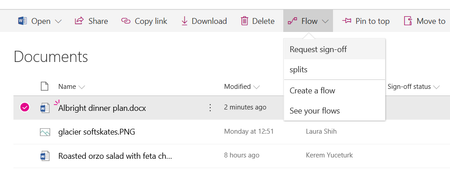
Introducing "Request sign-off" - an approval flow that requires no set up

I guess it will be mainly people who have recently reported a problem with this feature that will be monitoring this thread (if I reported it broken over 12 months ago I'd most likely have forgotten about it.. but my overall confidence around the Flow product would have been impacted)
I was a bit late to the party on this one.. is anyone saying that this feature is actually working.. with the exception of a few minority cases where the Sign-off status isn't gettting updated. I've actually never seen it working (though I haven't tested it more than half a dozen times).
So I'm wondering is the "file-locking issue" something that has been introduced recently? is it linked to recent changes relating to Auto-save? I'd have thought that as Co-authoring on files is expected as standard that we wouldn't be seeing "file-locking issues".
Glad to hear that the team are going to be looking at this

Colm Counihan wrote:
I guess it will be mainly people who have recently reported a problem with this feature that will be monitoring this thread (if I reported it broken over 12 months ago I'd most likely have forgotten about it.. but my overall confidence around the Flow product would have been impacted)
I was a bit late to the party on this one.. is anyone saying that this feature is actually working.. with the exception of a few minority cases where the Sign-off status isn't gettting updated. I've actually never seen it working (though I haven't tested it more than half a dozen times).
So I'm wondering is the "file-locking issue" something that has been introduced recently? is it linked to recent changes relating to Auto-save? I'd have thought that as Co-authoring on files is expected as standard that we wouldn't be seeing "file-locking issues".
Glad to hear that the team are going to be looking at this
The file lock issue isn’t new. You can repro it easily even using SharePoint UX. Try to update a property of a document when its open in the browser or client, you will get an error message that you cannot update the property.
- Colm CounihanFeb 14, 2019Iron Contributor
Thanks.
I've been able to reproduce the issue in the UX as you described and i can see how this might be causing the issue.
the question remains what is causing the "File lock" issue . from the testing I've done, I don't have the document open in the browser or the client.
Is the file getting opened and locked by Flow and when it tries to update the [status] column it can't because the flow has locked the file?
My original question was in relation to something having changed recently to cause this Flow to stop working or to find out if the Flow actually worked at some point? If the "file locking" issue is the root cause and this is a long-term Known issue then this Flow may never have worked end to end.
 Robin NilssonFeb 14, 2019Bronze Contributor
It must be a very basic type of locking, because it does it on custom list items as well. I know there's a locking mechanism in there as well to keep multiple people out of the item, but when starting this flow, theoretically only the Flow should have the lock - the person starting the flow is just on the view..