Forum Discussion

 Microsoft
Introducing "Request sign-off" - an approval flow that requires no set up
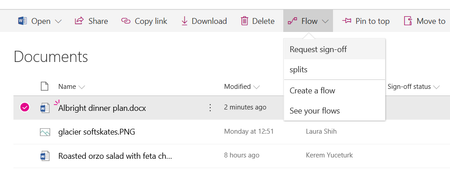

Is there a recent issue with this Flow?
Last week I started getting a message in the email confirmation saying...
"Note that we were not able to update the column in SharePoint because the file was locked by a user."
However the flow was previously working fine.
I'm now also able to replicate this issue across various Lists and across two Tennants (just to try and make sure we'd not broken out tennant!)
It seems that the approval/rejection happens and gets logged but the list item doesn't get the Sign off status field updated.
Its also reassuring and frustrating to realise that this is a feature 'under development' as there's nothing to suggest this on first appearance.
 Robin NilssonJan 29, 2019Bronze Contributor
I guess misery loves company - I also started a formal testing of this feature today, but on a custom list not a document library.
Same result as everyone else - final emails says 'signed off on your item. Note that we were not able to update the column in SharePoint because the file was locked by a user.
I've tried approving from the email. Approving from the mobile flow app. Same thing every time.
- Jer HarwoodJan 30, 2019Brass Contributor
Kerem Yuceturk - Is anyone at MS looking at this? I went to introduce this "great" feature to someone in leadership only to be embarrassed that it is BROKEN as others have pointed out recently. It appears it has been broken for a number of days now and there's nothing in O365 Admin Center about it.
- Chakkaradeep (Chaks) Chinnakonda ChandranFeb 11, 2019Former Employee
Hi all,
I am Chaks and have taken the ownership of this feature from Kerem. First off, thanks for the awesome feedback here. While I am happy to hear you all love this feature, I can feel your frustration when it comes to feature not working as expected!
Just wanted to provide some update on some of the issues reported here - especially with Sign-off column not being updated which is an after effect of the file being locked for a long time by the user. This could happen if the file is open in the browser or client for a long time, which is very common, as we can see from the responses in this thread itself. This issue exists today in SharePoint and as one of the users pointed out here, even a custom flow updating file properties will encounter this issue.
Good news is that the product team will be looking into this issue specifically for Request sign-off feature and ensure we are able to "fix" this issue in the product. I will keep this thread updated as and when we have more updates to share.
In the meanwhile, please do continue to share your feedback!
Thanks,
Chaks
