Forum Discussion

 Microsoft
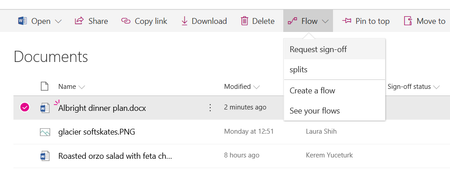
Introducing "Request sign-off" - an approval flow that requires no set up


Marcus_Khoo wrote:Hi Aaron, take a look at the reply from Kerem Yuceturk when he replied to Peter Baddeley on 06-23-2018 08:55 PM earlier in this thread.:D
the reply is :
Hi @Peter Baddeley, when a file is open, it is locked by the Office client (like Word, PowerPoint, etc.) or Office Online. Request sign-off will try to update the status of the file, and if it fails it will keep retrying at increasingly longer intervals up to two days to see if the file is unlocked. If you start it with the file open, the approval message should still go out even if the status is not set to "Pending", and once the file is closed within two days it should update to the Approved/Rejected state.
2 considerations , first - isn't it likely that the signee will need to have the document open in order to review the file before they can sign off.. and therefore the file is quite likely to be open when "approve" or "reject" is clicked.
The 2nd consideration is that the Flow is not updating the File itself (i.e. the blob) but rather should be updating one of the metadata columns. Is the original flow locking the file so that someone can't change the status directly in the list , i.e. independently of the Flow?
The scenario described by Aaron is also happening for me too by the way (I used this Flow for the first time today !). It might be fine from a business process perspective for the status to update within a day or 2.. however, this functionality won't demo well in a short session/workshop if the status doesn't update at the end of the Flow... I'll check in on the file/list/Flow on monday and see if the status has changed.
 Aaron_TPIJan 28, 2019Tin Contributor
Hi all,
Thanks for the feedback. Seems to me like this feature just plain doesn't work. The files were not open by me or anyone else when the workflows was started and it's now more than two days later after everyone's PC's were shutdown over the weekend and the status is still Pending. It's a shame as this would be really useful if it worked.
- Marcus_KhooJan 25, 2019Brass Contributor
Hi Colm,
Since the inner workings of this feature are hidden from us all, it is almost impossible to understand exactly why it is behaving as it does.
Personally I don't see this as a "production ready" feature at all.
:-(