Forum Discussion

 Microsoft
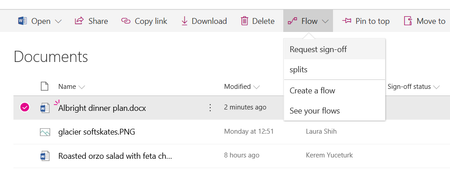
Introducing "Request sign-off" - an approval flow that requires no set up
 Microsoft
Hi Peter Baddeley, when a file is open, it is locked by the Office client (like Word, PowerPoint, etc.) or Office Online. Request sign-off will try to update the status of the file, and if it fails it will keep retrying at increasingly longer intervals up to two days to see if the file is unlocked. If you start it with the file open, the approval message should still go out even if the status is not set to "Pending", and once the file is closed within two days it should update to the Approved/Rejected state.

This lock out of the file seems to be causing some issues for our team. It doesn't ever seem to come back and complete the Approval. There seems to be a 10mins window (or something like that) where the file is locked out. We have ones sitting for weeks now at "pending" and has never changed.
Any ideas how to move this to Approved? as you can't mange the flow, re-submit etc
- Kerem YuceturkAug 24, 2018
Hi Deleted, sorry to hear this. The file will be locked out as long as there is an Office Online session open for it. It will try updating the values in certain intervals over two days, and eventually give up trying to update if the file is always locked away. Is this something happening for all files? Or is it a rare occurrence? Could it be that you have another programmatic process that is opening the file and not closing it?
Because the column we add is a text column, you should be able to change it yourself using SharePoint UX when the file is not locked to reflect the correct sign-off status.
- DeletedAug 26, 2018Not applicable
We have found this with not only your default workflow but all workflow. Basically if the file is opened by someone, wanting to review the document, as part of the approval process. And they approve it just after closing the file. It will come back with this message and it never moves on.
I would have thought that if multiple users can edit a document, then they should also be able to edit the meta data the same way (albeit only one column per user). This does not seem to be the case. Or alternately, the file should be able to be put in a read only mode while in approval ... or something like that.
- DeletedSep 10, 2018Not applicable
Further to this ... what we used to do in the old SharePoint flows is check the document out while the workflow is running, that way the users can only have a read only view and the workflow can edit what ever it needs to, I can't see any way to do this with approvals in Flow.
So with flow, as mentioned an email is sent to the approver, they open it to review the doc, then click approve, but the workflow won't complete. This makes it not usable ... correct me if I am wrong.