Forum Discussion

 Microsoft
Introducing "Request sign-off" - an approval flow that requires no set up
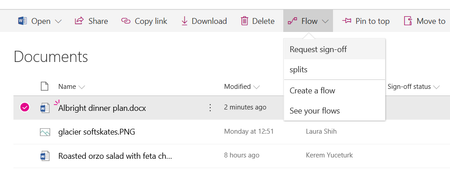

Hi Kerem, there're a couple of dilemmas we face with Flow approvals in general and "Request sign-off" in particular:
1. Approver actions are recorded in SPO Version History under the name of Requester, so there's no way in SharePoint to see who approved the item. It actually looks like Requester had approved it him(her)self. ( Audit red flag )
2. There's no direct link between SPO List/Library and Flow execution - would be nice to have a context menu with "Sign-off History"
- Kerem YuceturkJun 14, 2018
Hi Konstantin Kazantsev, thank you for this valid feedback.
Request sign-off is basically automating the steps of the current user setting up columns manually, and recording approval status in those places. You are correct that ideally, it would record the update with the name of the approver, but that's not possible with Flow approvals yet. We hope we get to that capability in the future.
For your second request, we do hope to add that history in a panel in a future release.
 Macha1976Oct 24, 2019Copper Contributor
Kerem Yuceturk Regarding this comment - You are correct that ideally, it would record the update with the name of the approver, but that's not possible with Flow approvals yet. - have any improvements been made yet to be able to see who approved the document?
 Jer HarwoodOct 28, 2019Brass Contributor
Macha1976, Kerem Yuceturk - You can create your own Flow to record the approver and their comments. It's just another couple of steps than the template Flow with an additional column to write the results to. The out of the box Flow (referenced in this thread) is more of a convenience without having to create a custom Flow.
 RichltntApr 17, 2019Copper Contributor
HiKerem Yuceturk thanks for the great feature - we like the simplicity of it - having ability to display who approved it would make this perfect for our uses - if it could be displayed as a column in the library - it would help greatly - glad to see its on a future plan
- Lukas_GrecmalMay 09, 2019Copper Contributor
Hi, Richltnt ,
the column in the library feature is already available in the current version. Just configure it in site information setting.
Site information->View all site settings->Site libraries and lists->Customize "Documents" (exmpale)->at the bottom of the page click on "All Documents" (Example) and on the right side you can set-up visibility and layout your columns.
Please note that first you need to at least open request for sign of to add it into column list.
