Forum Discussion

 Microsoft
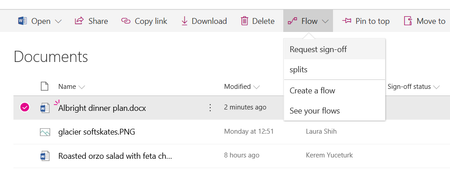
Introducing "Request sign-off" - an approval flow that requires no set up
 Microsoft
Hi Tanya Denton, Gabriel Smoljar, this is not using the "Approval Status" column that is associated with the content approval feature. That particular feature is usually not turned on for vast majority of the libraries, and as you know, it affects how items are displayed to visititors, and other members of the site. Also, in "Content approval" scenarios, the approvers for an item are locked, whereas in this scenario, it is open. We find that users would need some education on the implications of turning that feature on, and we wanted to enable a lighter weight scenario.
If your library uses content approval, you can still create a flow that automates your approvals. Back in December, we released the "Set Content Approval Status" action, which works primarily with Pages libraries, but can be made to work with other lists and libraries too. We are working on some closer UI integration for publishing scenarios that will be coming in a few months as well, but please let me know if there is anything that can be made better about using the "Set Content Approval Status" action that exists.

This is a great start to a very usable feature...but honestly, it will likely need a few tweaks to get heavy user adoption. Here are the following tweaks that come to mind immediately:
- Need to be able to store multiple (ALL) approval comments in a list or like SharePoint Designer used to. SPD used to aggregate all approver comments in a field called "ConsolidateComments" and then show them in ANY approval email that went out to approvers. Also, if the document is approved, all approvers should be Cc'd. These 2 features are the most important ones.
- The ability to choose a parallel or serial approval process.
- Configure what constitutes an approval (all approvers approve or first approval)
- Lastly, as Tanya said, this should tie into the Approval Status column. If users are asking for approvals on documents, chances are all documents in a library will need to go through an approval process (7 out of 10 times this how I've seen users organize their documents and libraries).
Great work! Hoping to see this developed a bit further.
- Kerem YuceturkMay 28, 2018
Hi Bill Kuhn, really appreciate the positive feedback. Our target for this feature was to keep it relatively simple.
The challenge we have found is that some of those tweaks (like parallel vs serial and all must approve vs. any approver can approve) adds complexity in the set up process and makes it hard to match exactly the business process that different users have in mind.
We do, however want to empower you to be able to build the approval solution that you have outlined that addresses those various needs. I believe what you have outlined can already be built today as a custom flow, and we want to make some additional templates available that will be displayed when you click on "Create new flow". Then users will be able to select the flow closest to their needs and then make the needed changes to finish setting it up.
We hope to make these new templates available in the next few months.