Forum Discussion

 Microsoft
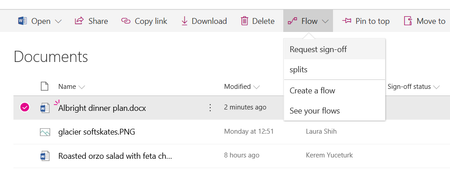
Introducing "Request sign-off" - an approval flow that requires no set up
 Microsoft
Hi Deleted,
This feature is designed as a shortcut to help our users be able to create a new column to record some metadata in a column, and then to wire up an approval process using flow. So like other columns that can be created by other users in the library, users with edit permissions will be able to edit this column as well. In a later version, we want to be able to show the date and time information on when an item was approved from the history that will be stored on the Flow approval center.
If your scenario requires more control, it may be better to use the content approval feature, which provides a column that can only be changed by users with Approve Items permission on the site. Request sign-off doesn't use this feature because of the implications this has on the library items that may not be desirable for the more common way libraries are used.

We want to collect the approval from three different Users and want to be sure that just them are able to approve it.
Do you think there will be a easy way to do this with Flow in the Future?
- Kerem YuceturkApr 17, 2018
Deleted, Benoit_Fournier, you should be able to accomplish this more authoritative approval flow using a combination of the content approval feature for your list or library and flow by using the "Set content approval status" action in flow to provide that approval. It takes more work to set up, I agree, but once set up, it should be able to do exactly what you want. It is harder for us to have that set up automatically as people use different types of business rules to enforce these.
- Tanya DentonApr 18, 2018Steel ContributorWhat would be a really good first starting point is for a 'Document ' Approval template which is like for like with the existing SharePoint Workflow available OOTB. Would would help users move away from SharePoint Workflows to flow is to make available templates for all the existing OOTB SPWF.
 Ovi MocanuApr 17, 2018Tin ContributorAs Kerem indicated “Set content approval status” works like a charm and “Send for Approval” action is very flexible (e.g. multiple approvers, everyone/anyone approves, etc.). You can also use the column formatter to start your Approval Flow for the selected item as per https://github.com/SharePoint/sp-dev-column-formatting/tree/master/samples/generic-start-flow
- Benoit_FournierApr 16, 2018Steel Contributor
I agree. We need a way to add a column with restricted access to a list. Only site administrators or process (flows; apps...) should be able to update it.

