Forum Discussion

 Microsoft
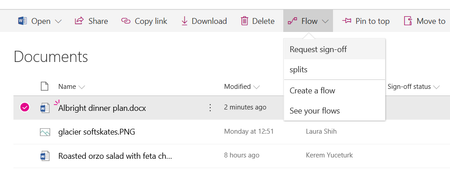
Introducing "Request sign-off" - an approval flow that requires no set up

 Microsoft
Hi Tanya Denton, Gabriel Smoljar, this is not using the "Approval Status" column that is associated with the content approval feature. That particular feature is usually not turned on for vast majority of the libraries, and as you know, it affects how items are displayed to visititors, and other members of the site. Also, in "Content approval" scenarios, the approvers for an item are locked, whereas in this scenario, it is open. We find that users would need some education on the implications of turning that feature on, and we wanted to enable a lighter weight scenario.
If your library uses content approval, you can still create a flow that automates your approvals. Back in December, we released the "Set Content Approval Status" action, which works primarily with Pages libraries, but can be made to work with other lists and libraries too. We are working on some closer UI integration for publishing scenarios that will be coming in a few months as well, but please let me know if there is anything that can be made better about using the "Set Content Approval Status" action that exists.
 Bill KuhnApr 20, 2018Copper Contributor
This is a great start to a very usable feature...but honestly, it will likely need a few tweaks to get heavy user adoption. Here are the following tweaks that come to mind immediately:
- Need to be able to store multiple (ALL) approval comments in a list or like SharePoint Designer used to. SPD used to aggregate all approver comments in a field called "ConsolidateComments" and then show them in ANY approval email that went out to approvers. Also, if the document is approved, all approvers should be Cc'd. These 2 features are the most important ones.
- The ability to choose a parallel or serial approval process.
- Configure what constitutes an approval (all approvers approve or first approval)
- Lastly, as Tanya said, this should tie into the Approval Status column. If users are asking for approvals on documents, chances are all documents in a library will need to go through an approval process (7 out of 10 times this how I've seen users organize their documents and libraries).
Great work! Hoping to see this developed a bit further.
- Kerem YuceturkMay 28, 2018
Hi Bill Kuhn, really appreciate the positive feedback. Our target for this feature was to keep it relatively simple.
The challenge we have found is that some of those tweaks (like parallel vs serial and all must approve vs. any approver can approve) adds complexity in the set up process and makes it hard to match exactly the business process that different users have in mind.
We do, however want to empower you to be able to build the approval solution that you have outlined that addresses those various needs. I believe what you have outlined can already be built today as a custom flow, and we want to make some additional templates available that will be displayed when you click on "Create new flow". Then users will be able to select the flow closest to their needs and then make the needed changes to finish setting it up.
We hope to make these new templates available in the next few months.
- Bill KuhnApr 20, 2018Copper Contributor
This is a great start to a very usable feature...but honestly, it will likely need a few tweaks to get heavy user adoption. Here are the following tweaks that come to mind immediately:
- Need to be able to store multiple (ALL) approval comments in a list or like SharePoint Designer used to. SPD used to aggregate all approver comments in a field called "ConsolidateComments" and then show them in ANY approval email that went out to approvers. Also, if the document is approved, all approvers should be Cc'd. These 2 features are the most important ones.
- The ability to choose a parallel or serial approval process.
- Configure what constitutes an approval (all approvers approve or first approval)
- Lastly, as Tanya said, this should tie into the Approval Status column. If users are asking for approvals on documents, chances are all documents in a library will need to go through an approval process (7 out of 10 times this how I've seen users organize their documents and libraries).
Great work! Hoping to see this developed a bit further.
- Tanya DentonApr 03, 2018Steel Contributor
Hi @Keremt Yuceturk, many thanks for the quick response. I am aware that this new Sign Off does not use the Approval Status column hence my post. I looked at the release 'Set Content Approval Status' and have had a go at creating a Flow for a 'document' library, however as others have commented in other posts, this is not available for document libraries, only list libraries (unless there has been an update to this in the last few weeks). If you can point me to a blog/post/help article relating to how to create an approval that interacts with the 'Approval Status' column; meaning when a user receives the Approval email with the Approve/Reject buttons, that when the click on Approve button in the email the flow actually updates the Approval Status to 'Approved'. All posts that i have seen have been based on creating your own Approval Status column and using that instead. Hope this makes sense.
- Eva VogelJan 15, 2019Steel Contributor
Hi Tanya Denton! I saw a good video on youtube by Shane Young about list/file content aprovals, look at this from Minute 7 on: https://www.youtube.com/watch?v=3shHcIgjxH4.
Greets, Eva.
- Kerem YuceturkApr 05, 2018
Hi Tanya Denton, the Etag needs to be set for libraries (pages and other files) to succeed. It is a bug that we don't clearly state that, and the ETag is hidden under advanced settings. We will fix that soon. You can get the ETag using the Get file metadata action in Flow.
Feel free to send me a private message with the specifics of your flow if that doesn't work for you.
 Ovi MocanuApr 04, 2018Tin ContributorHi Tanya,
‘Set Content Approval Status' action does work with Documents Libraries (at least it works for me at the moment 🙂) and it updates the ‘Approval Status’ accordingly if Content Approval is turned on for that specific library. You have to ‘Set Content Approval Status’ to Submit before you start an Approval and ‘Set Content Approval Status’ to Approved or Rejected based on the outcome for the Approval. Make sure you use the ETag property when setting approval status to either Approve or Rejected. I hope this helps. Jer HarwoodApr 05, 2018Brass Contributor
Ovi Mocanu - I'd like to see how you're using it with major and minor versioning. I just created one within the last week and had to create a trigger column and am using just major versioning. Here's a https://powerusers.microsoft.com/t5/Building-Flows/SharePoint-Approval-with-Create-or-Modify-as-trigger/m-p/86604/highlight/false#M8552. Maybe you're using a trigger column and then using the workflow to set the Approval Status to "Submit" (for publishing)?
