Forum Discussion

How to trigger a flow based on change in title column of documentset?
- Mar 07, 2022
RJDBakker
In this case, have you tried to add the additional, required condition within the triggers` settings?@and( NOT(equals( triggerBody()?['Title'], triggerBody()?['{Name}'] ) ) , equals( triggerBody()?['{ContentType}']?['Id'], '0x0123456789abcdefghijk9876543210kjihgfedcba' ) )

RJDBakker
You could accomplish this with an additional action and a condition after your trigger.
Look for the SharePoint connector action 'Get changes for an item or a file (properties only)'.
This way you get the columns which have been changed by comparing them to the previous version ('Since' expression below).
Dynamically link the site and the library from the triggers properties:
- site: trigger()?['inputs']?['parameters']?['dataset']
- library: trigger()?['inputs']?['parameters']?['table']
- ID: triggerOutputs()?['body/ID']
- Since : sub(int(triggerOutputs()?['body/{VersionNumber}']),1)
Afterwards use a condition to check if the title column returns true for any column change:
outputs('Get_changes_for_an_item_or_a_file_(properties_only)')?['body/ColumnHasChanged/Title']
This would not avoid the additional Flow run, but at least any action could depend on a certain column change only.
- RJDBakkerMar 07, 2022Copper Contributor
Thank you for your reply
Your suggestion is much useful.
But I am still looking for a way to not trigger the flow at all.
This is because of the fact that it will otherwise trigger 1000’s of time every week.Documents are changed and uploaded constantly. The metadata field will probably change a very few times during the lifespan of the document set.
At this point I think it is not possible to prevent the flow from starting based on the ‘only run when the title changes’ trigger and have to look for a more user unfriendly alternative.
The root cause of my problem is that the ‘filename’ field cannot be changed natively from a PowerApps form. During the initializing of the Document set I trigger a flow that copies the filename field to the title field. After that, the user has the possibility to change the title.
My idea was, that the title field then again would be copied to the filename field automatically.
- Micca0815Mar 07, 2022Iron Contributor
RJDBakker
In this case, have you tried to add the additional, required condition within the triggers` settings?@and( NOT(equals( triggerBody()?['Title'], triggerBody()?['{Name}'] ) ) , equals( triggerBody()?['{ContentType}']?['Id'], '0x0123456789abcdefghijk9876543210kjihgfedcba' ) )- RJDBakkerMar 14, 2022Copper Contributor
I really appreciate your response.
The additional trigger you suggested seems to do the trick.
I replaced the Content Type ID from your example of course.
Although I still find it a bit of a cumbersome way changing the filename trough PowerApps and Power Automate, your solution works! Thank you for your time.
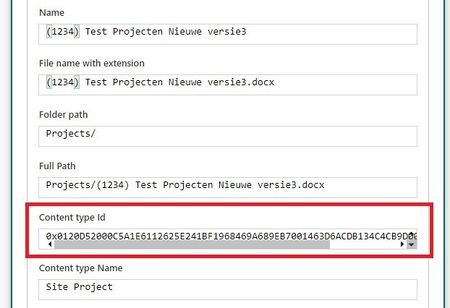
I thought it would be useful to post the complete working flow to understand the context:
I have a flow that is generating a document set. I use a customized PowerApps form to fill in the metadata for the document set. When using a custom PowerApps form, it is not possible to change the filename field. (at the time of writing) Instead I use the ‘title’ field in the form that is available for users to edit.
A Power Automate flow would trigger when this field does change and writes the change also back into the ‘filename’ field. But of course you want to prevent that the flow would start every time a file within the document set would change.
The triggers prevent this from happening:
@equals(triggerBody()?['{ContentType}']?['Id'], '0x0120D52000C5A1E6112625E241BF1968469A689EB7001463D6ACDB134C4CB9D00A39A6072585')

@and(NOT(equals(triggerBody()?['Title'],triggerBody()?['{Name}'] ) ),equals(triggerBody()?['{ContentType}']?['Id'],'0x0120D52000C5A1E6112625E241BF1968469A689EB7001463D6ACDB134C4CB9D00A39A6072585'))
These are set in the 'settings' from the trigger of the flow.
