Forum Discussion

How to create flow to copy files from one SP site to another when certain metadata tag is used

Hi Jon_Lake - thank you for the response.
I think I need more help with the first question before being able to wrap my mind around automating it across all sites.
With that said, let me ask the question this way -
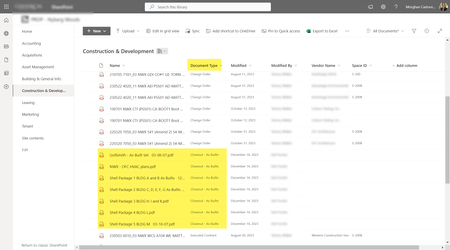
I upload Test File to Doc Lib 1 on Site 1 which is using Content Type "Document Type" in column 2.
I want to take any file uploaded and tagged as "Closeout - As-Builts" to Doc Lib 2 on Site 2.
Doc Lib 2 on Site 2 is NOT using content types (we don't need them - we just want the document copied over). Screenshots below --
Doc 1 Site 1 on the left. When file is uploaded, and Document Type "Closeout - As-Builts" is applied, copy to Doc 2 on Site 2:
I tested by clicking Upload > Files from Doc Lib 1 Site 1:
I upload "Test Doc 6.docx" to Doc Lib 1 to Site 1 and apply the Document Type (Content Type) "Closeout - As-Builts":
However, when I run a test with my flow, I get a message that the condition has not been met:
For reference, here is what I have so far in my Flow... I must not be doing something right:

Hi mdcastorena , I set up a test source folder and destination folder. I set my document type attribute using a choice field but that's not a requirement. It looked like this for the sake of testing.
I then use the 'Move file' action in the yes path of my condition. In testing it successfully moves the two qualifying files.
The files move with their attributes. I didn't create the document_type field in the destination folder, it was created automatically.
- mdcastorenaJan 08, 2024Brass Contributor
Hi Jon_Lake -
Thank you for the response! I want to keep the original file in Doc Lib 1 Site 1 and just copy the file to Doc lib 2 Site 2. Is that possible? Does your test keep the original file in it's source lib?
- Jon_LakeJan 08, 2024Brass Contributor
Hi mdcastorena , yes you can copy the file rather than move it.
- mdcastorenaJan 10, 2024Brass Contributor
Hi Jon_Lake - Can you please explain what Dynamic Content you're using in the first two steps (before the "For Each" step)? That is where I am getting stuck now (also, can you confirm I am using the correct trigger and Get File action? Sorry for so many questions; it has been a very long time since I've worked with Flow):
Thank you for your assistance!