Forum Discussion

How to create flow to copy files from one SP site to another when certain metadata tag is used
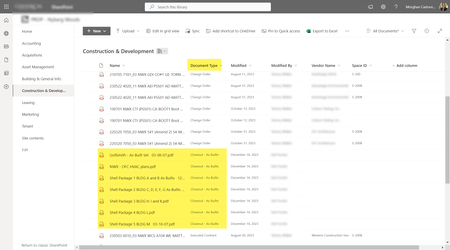

Hi mdcastorena , if consolidating to a single site and document library isn't possible you could consider a basic Flow on each which updates a central list with and changes from across all sites. The simple Flows would update the list with the source site detail, document detail and the change. Then, a single 'master' Flow would monitor changes to the list and evaluate the change in the Document Type attribute. If it meets your criteria it would then use the list metadata to move the file to the correct location.
I haven't built an example but that is how I might first approach the problem.
 mdcastorenaJan 05, 2024Brass Contributor
Hi Jon_Lake - thank you for the response.
I think I need more help with the first question before being able to wrap my mind around automating it across all sites.
With that said, let me ask the question this way -
I upload Test File to Doc Lib 1 on Site 1 which is using Content Type "Document Type" in column 2.
I want to take any file uploaded and tagged as "Closeout - As-Builts" to Doc Lib 2 on Site 2.
Doc Lib 2 on Site 2 is NOT using content types (we don't need them - we just want the document copied over). Screenshots below --
Doc 1 Site 1 on the left. When file is uploaded, and Document Type "Closeout - As-Builts" is applied, copy to Doc 2 on Site 2:
I tested by clicking Upload > Files from Doc Lib 1 Site 1:
I upload "Test Doc 6.docx" to Doc Lib 1 to Site 1 and apply the Document Type (Content Type) "Closeout - As-Builts":
However, when I run a test with my flow, I get a message that the condition has not been met:
For reference, here is what I have so far in my Flow... I must not be doing something right:
- Jon_LakeJan 06, 2024Brass Contributor
Hi mdcastorena , I set up a test source folder and destination folder. I set my document type attribute using a choice field but that's not a requirement. It looked like this for the sake of testing.
I then use the 'Move file' action in the yes path of my condition. In testing it successfully moves the two qualifying files.
The files move with their attributes. I didn't create the document_type field in the destination folder, it was created automatically.
- mdcastorenaJan 08, 2024Brass Contributor
Hi Jon_Lake -
Thank you for the response! I want to keep the original file in Doc Lib 1 Site 1 and just copy the file to Doc lib 2 Site 2. Is that possible? Does your test keep the original file in it's source lib?