Forum Discussion

andymx
Jan 30, 2024Copper Contributor
Choice Column in SharePoint not Populating Correctly from Forms?
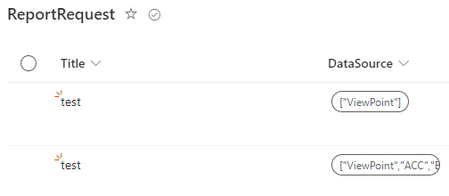
Hi everyone, Reaching out today as I am running into a new issue that did not used to exist. I have a MS Form which after completed triggers a Flow that stores the data in a SP List. The probl...

andymx
Jan 31, 2024Copper Contributor
How can I convert the string to a json? I dont remember ever needing to do this step to match option select with other option selects between Forms and SP. The only thing that was changed on the SP choice column side was updating it to add new values as to match with the Form 1 to 1

tmayrand
Jan 31, 2024Brass Contributor
andymx, your SP List choice column may have been changed from single selection to multi-selection. This is the only thing that I think could explain the change. If the choice field is multi-selection, then an object must be passed to set its value(s).
That or Rob_Elliott's hypothesis.
To answer how to convert your form multi-choice input string to an object...
The mluti-value choice from Forms produces a string resembling:
"[\"choice 1\", "\choice 4\"]"
The following json instruction (in the Select operation):
json(outputs('Get_response_details')?['body/<choice_attribute_id_or_path+name>'])converts the Forms string to a JSON array as follows:
[
  "choice 1",
  "choice 4"
]
The Select operation allows you to remap this array of strings to an array of objects (format consumable by the Sharepoint Create/Update Item connector:
[
  { "Value": "choice 1" },
  { "Value": "choice 4" }
]