Forum Discussion

Choice Column in SharePoint not Populating Correctly from Forms?
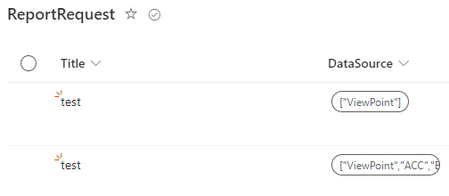

Did you check to make sure there are no errant hidden characters? I just ran a quick check and seems to be working correctly on my end. Was anything changed on the SP choice column side?
Is it a multi-choice selection?
I convert the string to a json object (will result in an array) so that it can be consumed by the Select operation, which will remap from a simple array to an array of objects.
Make sure to think about error handling in the following cases:
- If the selection is optional, the Select operation will fail.
- SP list expects a value from the choice list and none or one not in the list was provided.
This thread also provides another approach: https://powerusers.microsoft.com/t5/Building-Flows/SharePoint-Choice-Field-ARRAY-Requires-quot-Apply-to-Each-Step/td-p/693820

- tmayrandJan 31, 2024Brass Contributor
andymx, your SP List choice column may have been changed from single selection to multi-selection. This is the only thing that I think could explain the change. If the choice field is multi-selection, then an object must be passed to set its value(s).
That or Rob_Elliott's hypothesis.
To answer how to convert your form multi-choice input string to an object...
The mluti-value choice from Forms produces a string resembling:
"[\"choice 1\", "\choice 4\"]"The following json instruction (in the Select operation):
json(outputs('Get_response_details')?['body/<choice_attribute_id_or_path+name>'])converts the Forms string to a JSON array as follows:
[
  "choice 1",
  "choice 4"
]
The Select operation allows you to remap this array of strings to an array of objects (format consumable by the Sharepoint Create/Update Item connector:
[ { "Value": "choice 1" }, { "Value": "choice 4" } ] - Rob_ElliottJan 31, 2024Silver Contributor
andymx it looks to me that you might have changed the question in Forms to allow multiple selections rather than just 1 selection.
Rob
Los Gallardos
Microsoft Power Automate Community Super User.
Principal Consultant, SharePoint and Power Platform WSP Global (and classic 1967 Morris Traveller driver)
