Forum Discussion

Choice Column in SharePoint not Populating Correctly from Forms?
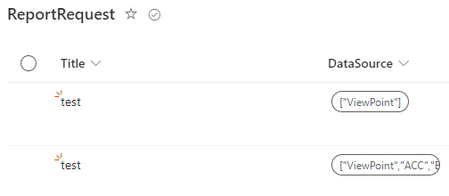

Did you check to make sure there are no errant hidden characters? I just ran a quick check and seems to be working correctly on my end. Was anything changed on the SP choice column side?
Is it a multi-choice selection?
I convert the string to a json object (will result in an array) so that it can be consumed by the Select operation, which will remap from a simple array to an array of objects.
Make sure to think about error handling in the following cases:
- If the selection is optional, the Select operation will fail.
- SP list expects a value from the choice list and none or one not in the list was provided.
This thread also provides another approach: https://powerusers.microsoft.com/t5/Building-Flows/SharePoint-Choice-Field-ARRAY-Requires-quot-Apply-to-Each-Step/td-p/693820
 andymxJan 31, 2024Copper ContributorHow can I convert the string to a json? I dont remember ever needing to do this step to match option select with other option selects between Forms and SP. The only thing that was changed on the SP choice column side was updating it to add new values as to match with the Form 1 to 1
- tmayrandJan 31, 2024Brass Contributor
andymx, your SP List choice column may have been changed from single selection to multi-selection. This is the only thing that I think could explain the change. If the choice field is multi-selection, then an object must be passed to set its value(s).
That or Rob_Elliott's hypothesis.
To answer how to convert your form multi-choice input string to an object...
The mluti-value choice from Forms produces a string resembling:
"[\"choice 1\", "\choice 4\"]"The following json instruction (in the Select operation):
json(outputs('Get_response_details')?['body/<choice_attribute_id_or_path+name>'])converts the Forms string to a JSON array as follows:
[
  "choice 1",
  "choice 4"
]
The Select operation allows you to remap this array of strings to an array of objects (format consumable by the Sharepoint Create/Update Item connector:
[ { "Value": "choice 1" }, { "Value": "choice 4" } ] - Rob_ElliottJan 31, 2024Silver Contributor
andymx it looks to me that you might have changed the question in Forms to allow multiple selections rather than just 1 selection.
Rob
Los Gallardos
Microsoft Power Automate Community Super User.
Principal Consultant, SharePoint and Power Platform WSP Global (and classic 1967 Morris Traveller driver)
