Forum Discussion

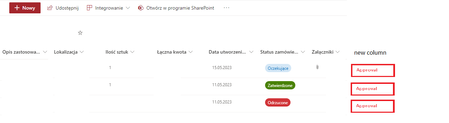
Approval button in SharePoint list
- May 17, 2023
SebastianSzyroki you can do this with JSON column formatting. Create a single line of text column and format it in advanced mode with the following JSON. You will need to change the actionParams line to your flow's ID and you can change the CSS in the style section, the icon and the button text in the txtContent line. When the user clicks the button it will trigger the approval flow.
{
  "$schema": "https://developer.microsoft.com/json-schemas/sp/v2/column-formatting.schema.json",
  "elmType": "button",
  "customRowAction": {
    "action": "executeFlow",
    "actionParams": "{\"id\": \"50097cde-b800-4c6c-ade9-95be7574f4e5\"}"
  },

  "style": {
    "border": "none",
    "background-color": "#f6ec6a",
    "cursor": "pointer"
  },
  "children": [
    {
      "elmType": "span",
      "attributes": {
        "iconName": "Flow"
      },
      "style": {
        "padding-right": "6px"
      }
    },
    {
      "elmType": "span",
      "txtContent": "Send to Manager"
    }
  ]
}
Rob
Los Gallardos
Microsoft Power Automate Community Super User


SebastianSzyroki I don't think it is possible to approve/reject flow approval directly from SharePoint list using default capabilities of SharePoint and SharePoint JSON formatting.
There is no default action like approveFlow in SharePoint JSON formatting.
Here's is what you can do:
- Create a power automate approval using Create an approval which will give you Respond link as mentioned at: Get Approval Item Link
- Save that link in one of the column against same list item
- Use JSON formatting to create a hyperlink using the approval link in SharePoint list. Refer: Turn field values into hyperlinks (basic)
- When user clicks the hyperlink, user will be navigated directly to approvals section in Power Automate portal with respective approval task opened in panel.
Please click Mark as Best Response & Like if my post helped you to solve your issue. This will help others to find the correct solution easily. It also closes the item. If the post was useful in other ways, please consider giving it Like.
SebastianSzyroki Did you try the steps given in my response above? Is it working for you?
Please click Mark as Best Response & Like if my post helped you to solve your issue. This will help others to find the correct solution easily. It also closes the item. If the post was useful in other ways, please consider giving it Like.