Forum Discussion

Rolling out: Guest access support for tasks in Planner
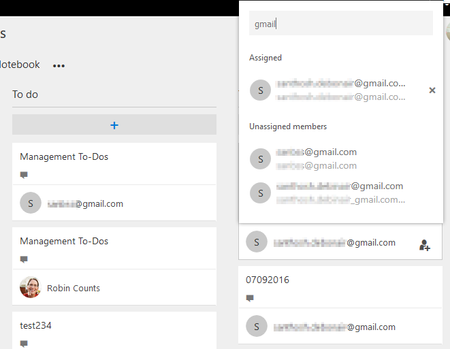

Does this actually work? I can invite a guest user as you show in your screenshot...
but when the guest user signs in... they don't seem to be able to access Planner at all???
Also all references to guest access and planner seem to have dissappeared from the roadmap

William Evans, Hi, The external user cannot able to login to Planner to view his cards as of now. Support for external user is in roadmap. But you can able to assign tasks to external users as they are supported in O365 Groups. The external user will get email notification for all updates and can participate via groups. Also external user can post an update to the task by just replying to the email and it will be available in the comments section in the task card. HTH.
 Jose Resto-TorresDec 11, 2017Copper Contributor
Hola,
Has this functionality been worked? Or any idea of when it can be made available to guest-users?
- SanthoshB1Dec 11, 2017Bronze ContributorSeems MSFT is still working on this feature..... https://planner.uservoice.com/forums/330525-microsoft-planner-feedback-forum/suggestions/11585187-allow-external-users-to-view-edit-tasks
 Dave NortonDec 14, 2017Brass Contributor
Do you know how this works?
First the guest user has to have a active office365 Account with Azure AD.
Second, the assigned Licence has to be configured for "Teams" and "Planned" and the function Switches has to be activated
I have setup a test plan to invite you