Forum Discussion

REQUEST - Be able to Paste images into Notes and Comments field!
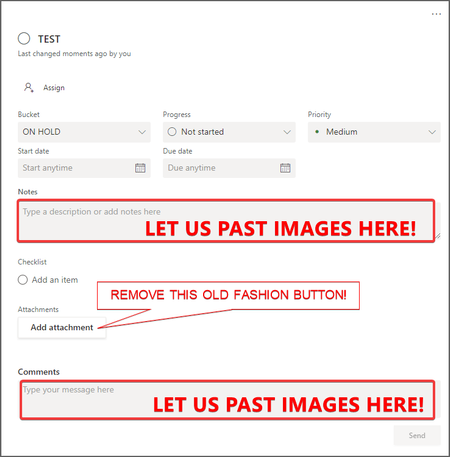


Yeah, this is so frustrating. For those of us who want to use Teams as a way to manage projects for our team, that means using Planner for the task portion, but w/o this feature, it's not really usable.
Having said that, I get that this is probably a very difficult change to make. The description and comment fields are just plain text. That's a very different data model from being able to store complex data, which is effectively the text, plus attachments, plus a whole bunch of metadata to indicate how to display it. If not built this way in the first place, it's probably quite challenging to change. And, if you think of Planner's origins, I bet they were thinking more about notes on tasks in something like MS Project -- a fantastic project management tool -- that also does not support this and probably couldn't without an entire rewrite. The difference is that MS Project is not really intended as a communication tool, except for status/date updates. In contrast, many of us want to use the comments in Planner like an ongoing chat on the task, like people have used Trello, Jira, Asana, etc. for years. MS completely dropped the ball by not recognizing that was the proper comparison, not MS Project.
Still, glad that the date for this feature landing got updated. Sep of this year, while depressing, is at least believable. Maybe that does indicate they're working on it and are just having trouble, so needed to push out the delivery date to something more realistic.
- GraniteStateColinAug 08, 2022Iron Contributor
Still showing as September of 2022 (as of today at https://www.microsoft.com/en-us/microsoft-365/roadmap?filters=&searchterms=85688). Will we really see this in another month? I'm skeptical but hopeful. If you want this, try to hitting the Feedback button on that page and submitting your desire for this feature and more updates on where it stands.
I also just found this additional page that explains how they're making this kind of a change: https://pupuweb.com/mc295027-rich-text-images-planner-task-notes/. Looks like they're adding an additional rich media field and keeping it in sync with text in the existing plain text field. That's probably the right way to do that and preserve backward compatibility, but also illustrates the complexity of this change.
- GraniteStateColinSep 07, 2022Iron ContributorStill showing release in Sep 2022, even now that we are in Sep 2022. I sent MS a note asking if this is still correct and this feature is really coming this month. My guess: it's not. I'd love to be wrong.
- GraniteStateColinDec 05, 2022Iron Contributor
They have updated to a rollout beginning in December and finishing in December 2022, without images at first (just rich text):
https://www.microsoft.com/en-us/microsoft-365/roadmap?filters=&searchterms=85688
https://pupuweb.com/mc295027-rich-text-images-planner-task-notes/As explained at the second link, this is because they need to build a new API's that is backwards compatible with any existing programs that work with Planner and treat the fields as plain text. They will achieve this by syncing the plain text and rich text as two different fields. It's not clear what's needed to add image support (the only part I care about), but I suspect that's at least partly due to needing the mobile versions of the apps add support so that users don't inadvertently delete embedded images while editing a description (not possible to edit a comment, so not sure what the issue is there).
 CarloBenedictiAug 08, 2022Copper Contributor
GraniteStateColin I cannot wait anymore the MS team. I am working with the my colleagues of IT team to tune an internal ticketing system for our engineering use.