Forum Discussion

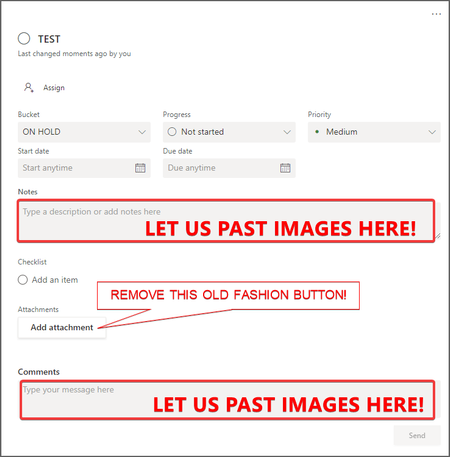
REQUEST - Be able to Paste images into Notes and Comments field!

This is GREAT NEWS!! Here's a URL for others who end up on this page like I did when searching for information on this to check on the status: https://www.microsoft.com/en-us/microsoft-365/roadmap?filters=&searchterms=85688.
Now let's just hope that MS can keep to this schedule. For us, like for other posts here, this is the critical deficiency with Planner. We can't use it for software development if we can't quickly and easily paste screen shots into comments or initial task items. The way this works in Jira, Trello, or even Microsoft's own Teams Chat/Posts is perfect. Need to be able to paste images, not save them to a file, then navigate to the file to attach them. That turns a 1 second process into about a minute, which is long enough to destroy productivity and keep the team from being willing to use Planner, which in turn undermines interest in Teams too (even though Teams supports this capability in its own Chat windows, if we have to use Jira or Trello for project work, then Teams is much less attractive as a platform).
So glad it looks like this is finally coming to Planner too.

- GraniteStateColinNov 29, 2021Steel ContributorI notice it says, "Users can insert rich text and images into task notes." That's not necessarily the same as pasting images. I wish it said, "Users can insert rich text and PASTE images into task notes." or "Users can paste or insert rich text and images into task notes."
I sure hope it supports simple paste (e.g., Ctrl-V) for screen captures like Teams Chat and not embedding as a file attachment. It's the time it takes to save and attach a file that's the whole problem for our team.