Forum Discussion

mateuszit11111
May 26, 2026Copper Contributor
Notifications settings missing
Hello, M365 Business Standard, global admin I've created a couple of plans in Planner for a couple of users, however we don't receive any notification when a new task is created or completed. L...

Jamony
Jul 07, 2026MCT
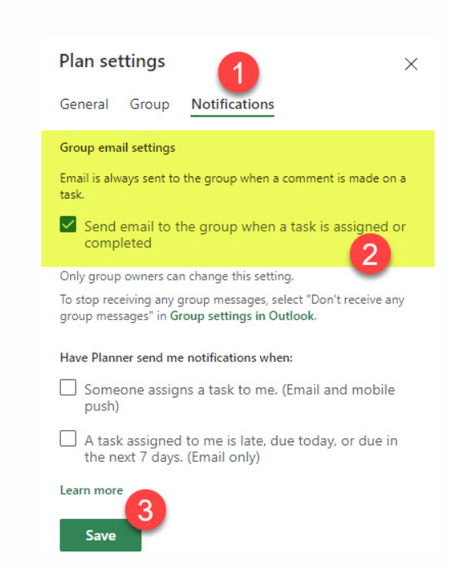
Planner notifications can be a little split between Planner, the Microsoft 365 group behind the plan, and the user’s mailbox settings.
I’d test with one simple assigned task with a due date and confirm whether the assigned user gets an assignment email. Then check whether users are subscribed to the Microsoft 365 group in Outlook, and check junk/quarantine just in case mail is being generated but filtered.
If you need reliable notifications for “task created” and “task completed,” Power Automate is often the cleaner admin-friendly route. You can build a small flow that watches the plan and sends the exact email/Teams notification you want.