Forum Discussion

serdarulutas
Dec 04, 2023Copper Contributor
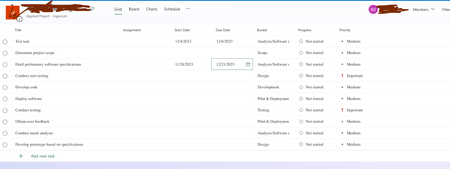
Microsoft Planner - "Depends on" column is not visible in Grid view
I created the project from a template and I am the only member. Why do I not see the "Depends on" column? What am I missing? I just wanted to create dependencies between tasks.

CFran020
Jun 24, 2025Copper Contributor
I am having the same issue and did some digging. It would appear that the "Depends On" column is a Premium feature: https://www.marque360.com/microsoft-planner-basic-vs-premium-plan/
This was the only explanation I was able to find. Hope that helped?
You can probably get around the need for Premium Planner with PowerAutomate, but that is going to require some setup and is very much not a solution for those of us who are less tech-savvy.